SIM Lifecycle Management (FN-1009)
About this document
Scope
This document provides background information as well as a functional description of the FN- SIM Lifecycle Management core feature. The described feature is supported from the release version 4.0 onwards.
Feature Availability
Feature Version | Available from | Summary of changes |
|---|---|---|
v1 | CMP Release 4.0 | Initial release |
Feature overview
Goals
The aim of the SIM Lifecycle Management feature is to provide a flow of statuses that describe the different stages of a SIM Card’s lifespan in CMP.
Functionality of the feature
SIM Lifecycle
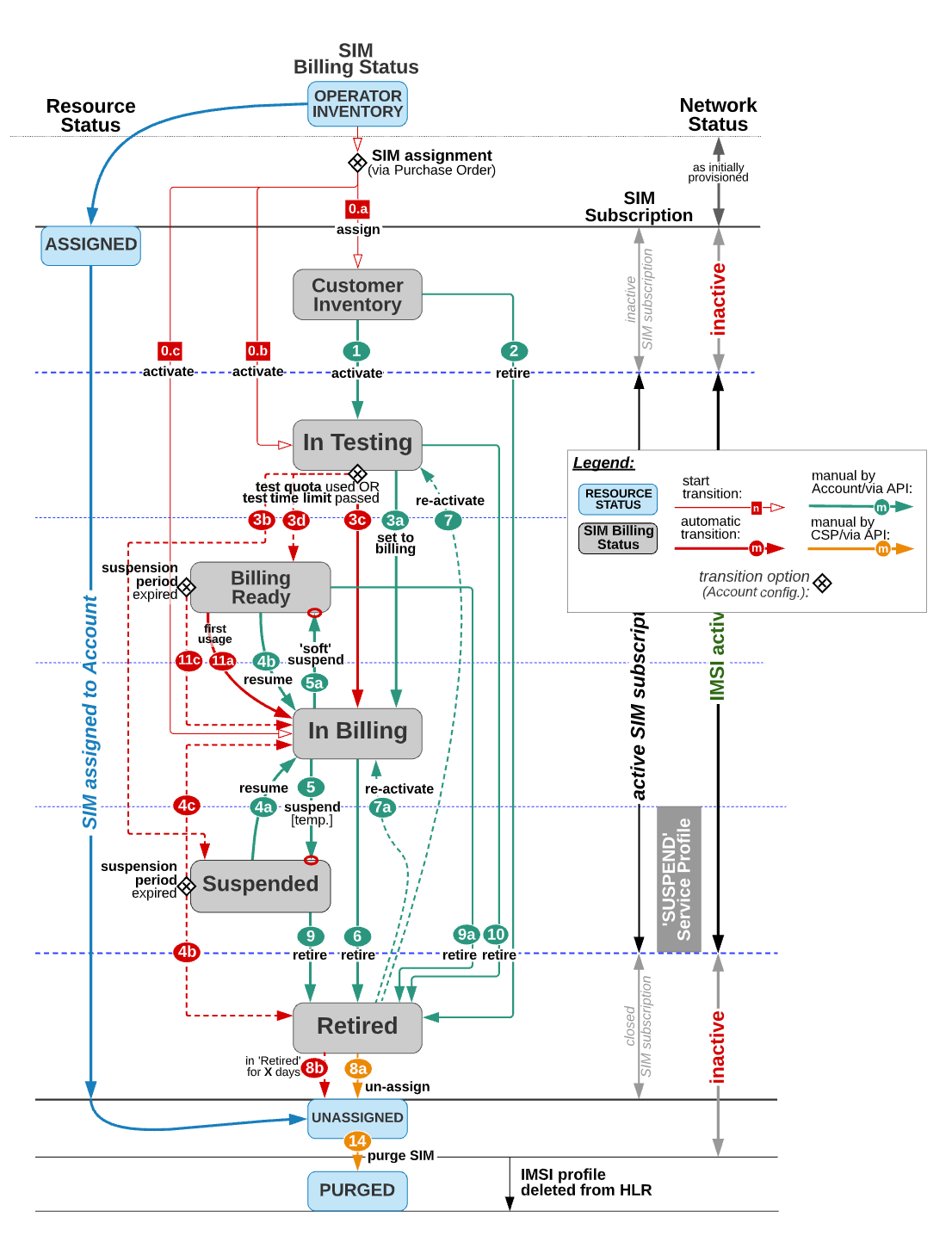
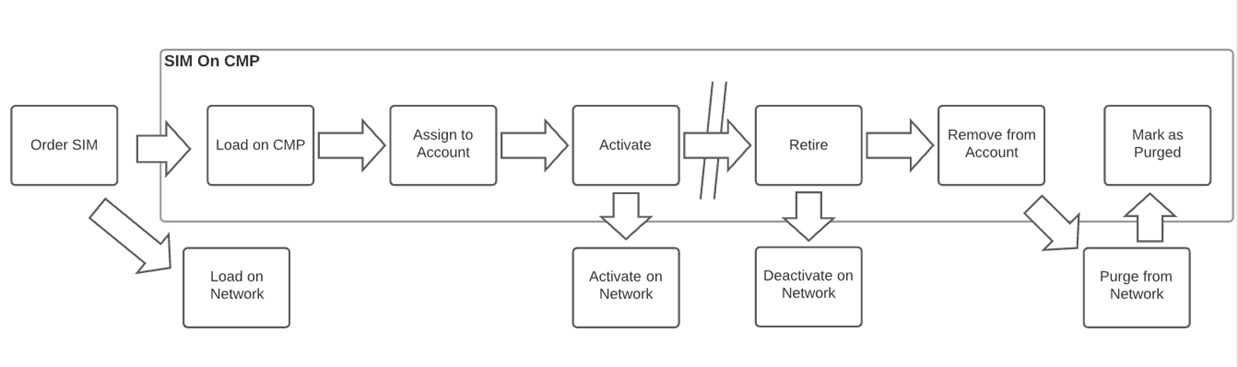
SIM Cards managed in the CMP have multiple statuses during their lifecycle. The following diagram shows a simplified view of the SIM Lifecycle.
Each SIM Card managed in the CMP follows a SIM specific resource lifecycle, which describes the different statuses of the lifecycle of the physical SIM Cards managed by the Service Provider.
SIM Resource Status | ||
|---|---|---|
Status | Description | Transitions to |
Operator Inventory | A SIM state where the SIM is loaded into CMP and is in the Operator's Inventory. It is not assigned to an Account. The SIM is available for assignment to an Account via the PO process. The SIM cannot attach to the Network, nor consume Network Services. | Assigned |
Assigned | A SIM state indicating that the SIM is assigned to an Account. SIM Billing Status and SIM Network Services states are valid. SIM Network Status is set to ACTIVE. The transition into this state is the result of the PO process completion. | Unassigned |
Unassigned | A SIM state indicating that the SIM has been unassigned from an Account. It is still provisioned on the HLR. The SIM cannot attach to the Network, nor consume Network Services. | Purged |
Purged | A SIM state indicating that the SIM has been removed from the HLR. | none |
Order SIM
SIM Cards ordered from a SIM Vendor by the Service Provider, and SIM Vendors fulfill the SIM Orders by providing SIM Batched.
Load SIM
SIM Cards ordered from the SIM Vendor that will be managed by the Service Provider are loaded into the CMP using SIM Upload Files provided by the SIM Vendor. Once the SIM File has been loaded into CMP the SIM Resource Status of the uploaded SIM Cards is set to Operator Inventory. At this point, the SIM Cards are available for assignment via the Purchase Order process.
Assign to Account
After the completion of a successful PO process, SIMs are assigned to an Account. The Network Status of the SIMs, which indicates whether a SIM can attach to the Network (i.e. it refers to its permission to engage in data, SMS, and voice sessions over any mobile network) is set to ACTIVE.
SIM Network Status | ||
|---|---|---|
Status | Description | Transitions to |
ACTIVE | A SIM state indicating that the IMSI flag is set to ACTIVE in HLR and therefore the SIM can attach to the Network. The transition to and from this state is usually triggered automatically from the SIM lifecycle changes. It can also be triggered manually when the SIM Billing Status is In-Testing, Billing Ready or In-Billing. | INACTIVE |
INACTIVE | A SIM state indicating that the IMSI flag is set to INACTIVE in HLR and therefore the SIM cannot attach to the Network. The transition to and from this state is usually triggered automatically from the SIM lifecycle changes. It can also be triggered manually when the SIM Billing Status is In-Testing, Billing Ready or In-Billing. | ACTIVE |
Activate
Once the SIM is assigned to an Account and is in Network Status ACTIVE, users can view and manage the Billing Status of the SIMs’ subscriptions. The SIM will start in the SIM Billing Status defined in the Account settings. Typically this is Customer Inventory or In Testing. In Billing and Suspended are also supported. The initial Billing Status of a SIM Card is defined by the Default Subscription Status configured for its Account at Account Creation. The following values are available:
Customer Inventory
In Testing
In Billing
Suspended
Retired
SIM Billing Status | ||
|---|---|---|
Status | Description | Transitions to |
Customer Inventory | This status indicates that the SIM is already assigned to an Account, but the subscription is not yet active. | In Testing, Retired |
In Testing | In case there has been a test allowance (e.g., free test data volume of 1024 kB) agreed, the SIM will stay in this status until the test allowance has been consumed. Depending on the configuration of the Account the SIM transitions into In Billing or Suspended after the test quota is used or the test time limit is passed. Test allowance and Test time limit are defined in the Price Plan assigned to the SIM. A User with the necessary Access Rights can initiate charging by manually setting the Billing Status to In Billing before the test allowance limit has been reached. | In Billing, Suspended |
Billing Ready | This status indicates that the SIM Card has an active Customer contract. The SIM is able to connect to the Network but billing is stopped. With the first traffic event, the SIM will be set to In Billing, and agreed fees are applied. In case there are no traffic events during a Billing Cycle (which would set the SIM to In Billing), no subscription nor any usage fees for this Billing Cycle will be charged. | In Billing, Retired |
In Billing | Once the SIM Card has been set to In Billing each consumption will be charged according to the assigned Price Plan. In the case that the SIM is no longer used for connectivity services, the contract can be terminated. This will set the SIM to the status Retired. | Suspended, Retired |
Suspended* | A SIM state which restricts the SIM Card from consuming Network Services. This state allows the enterprise to temporarily block the SIM from using network services for a variety of business reasons. Suspending a SIM interrupts charging until the SIM Card is either resumed or retired. | In Billing, Retired |
Retired | A SIM state which represents the termination of all services pertaining to the SIM. In this state the SIM cannot access any services (Voice, Data or SMS) and is not able to register on the mobile network. Monthly charges are stopped and the SIM becomes available to be unassigned from the Account. | In Testing, In Billing |
*SIM Suspension
A SIM Suspension Period can be configured on Account level, which defines how many days a SIM Card can remain in Suspended state before transitioning to the next state defined by the Suspension Expiry Transition Status. The maximum length of the Suspension Period is 120 days. The Suspension Expiry Transition Status determines whether the SIM transitions into In Billing or Retired after the Suspension Period is over. If the Suspension Expiry Transition Status is set to Not Applicable, the Suspension Period is unrestricted.
Transition to Billing Status Suspended is only allowed if there was no other suspension during the preconfigured timespan of X (e.g. 365) days, which indicates how long the time period needs to be between two manual suspensions. If the parameter is set to 0, there is no limitation to the number of suspensions. Note that X is configurable per CMP instance.
SIM Suspend Reason
CMP will record and allow to retrieve the reason why a SIM Card is currently suspended. The following table details the available Suspend Reasons. The default Suspend Reason is Not Applicable, which applies in case the SIM Card is not suspended.
Suspend Reason | Description |
|---|---|
USER-PERMANENT | User/API Permanent | SIM Card has been permanently suspended by a User or API. |
USER-TEMPORARY | User/API Temporary | SIM Card has been temporarily suspended by a User or API. |
AUTOMATION-RULE-PERMANENT | Automation Rule Permanent | SIM Card has been permanently suspended by an Automation Rule. |
AUTOMATION-RULE-TEMPORARY | Automation Rule Temporary | SIM Card has been temporarily suspended by an Automation Rule. |
ACCOUNT-SUSPENSION | Account Suspension | SIM Card has been suspended as a result of Account Suspension. |
TESTING-EXPIRY | Testing Expiry | SIM Card has been suspended due to the expiry of the testing period. |
SUSPENDED-CSP | CSP Suspend (for future use) | SIM Card has been suspended as a result of CSP Suspension. |
The Suspend Reason of each SIM Card in Billing Status Suspended is visible on the Enterprise Portal. Enterprise Users are informed as to why a SIM Card has been suspended so that they can access the options for changing the SIM settings.
Retire
To terminate all services of a SIM it has to be retired. A retired SIM cannot access any services, nor can register to the Network. Once a SIM is retired in the CMP it is also deactivated on the Network. Retired SIMs are available to be unassigned from the Account.
Remove from Account
A SIM Card in Resource Status Unassigned is no longer assigned to an Account but is still provisioned on the HLR. Once a SIM has been unassigned from an Account, it can be re-assigned again via the Purchase Order process.
Mark as Purged
To remove the SIM from the HLR as well, the SIM has to be purged from the Network and transitioned to Resource Status Purged. Note that even though the SIM is removed from the HLR, all SIM related resources (ICCID, IMSI, and MSISDN) will never be deleted from the CMP.
Changing SIM Billing Status
Changing the Billing Status of a SIM Card in CMP is possible both manually and automatically. Green lines on the diagram above indicate manual changes to the SIM Billing Status and red lines indicate changes that are triggered automatically by CMP when specific events (e.g. test quota expired) occurred.
The SIM Billing Status can be changed manually using the Enterprise Portal GUI or API.
The Billing Status of a SIM Card can also be changed by using Automation Rules. To change the Billing Status through automation an Automation Rule (e.g. Data Usage - Billing Cycle) has to be combined with the Action ‘Change SIM Billing Status’. In this case, once the threshold of the rule is met, the Billing Status of all the related SIM Cards will be changed to the Billing Status defined by the Action.
SIM Card States and Status Changes
These different SIM states and status changes described in this document have interdependencies. The following diagram shows the state transitions of the SIM Resource Status, SIM Billing Status, SIM Network Status, and SIM Network Services.