
Supplemental Price Plans (FT-1014.010)
About this document
Scope
This document provides background information as well as a functional description of the FT-1014.010 Supplemental Price Plans core extended feature.
The described feature is supported from the release version 4.0 onwards.
This feature is part of the Price Plan Types functionality with number FN-1014.
Feature Availability
Feature version | Available from | Summary of changes |
|---|---|---|
v1 | CMP Release 4.0 | Initial release |
v2 | CMP Release 5.4 | Top-On Top-Up |
Feature overview
Goals
The aim of the Supplemental Price Plans feature is to allow the creation and self-care of Top-Off, Top-On and Top-Up Price Plans, which enables an Account User of an Enterprise to purchase additional usage for a limited period of time.
Out of scope
Network Group Price Plans
Tiering
Top-Off, Top-On & Top-Up as a Postpaid solution
Prepaid Overage on Supplemental Price Plans
Technical Prerequisites
This feature does not require any specific technical integrations for standard operation.

While no direct dependencies apply in typical scenarios, additional integrations or configurations may be necessary depending on the customer's infrastructure, business processes, or regulatory environment.
Functionality of the feature
CMP provides different types of Supplemental Price Plans, that allow Accounts to avoid overage costs by providing access to a prepaid amount of allowance.
Top-Off
Top-On
Top-Up
Supplemental Price Plans have the same behavior for Retrorated and Prorated Accounts.
Each Account can have none, one or multiple Supplemental Price Plans assigned and can have multiple of each type on each level active at the same time.
Supplemental Price Plans can start at any time in the Billing Cycle, and the length of the validity period is not restricted by the Billing Cycle, except for the Top-Up that only applies until the end of the Billing Cycle. Supplemental Price Plans will expire when any of the service allowances (data, SMS, or voice) is consumed, or the validity has expired.
The Period Fee of the Supplemental Price Plan is charged when the Price Plan gets active and issued with the next following invoice.
Top-Off
A Top-Off is a Prepaid Zone Price Plan that
has a dedicated validity (in days), and
support Auto-Renew capabilities.
A Top-Off consumes any overage until consumed or expired. It also consumes overage retrospectively from the Billing Cycle in which it gets activated.
Top-Off Price Plans can be assigned at the following levels:
Account (covers any Overage of any SIM at the given Account),
Price Plan (covers any Overage of the given Price Plan, any Postpaid Pool and Prepaid Pools with Prepaid Overage are supported), and
SIM (covers any Overage of a specific SIM Card, regardless of its Price Plan).
A Top Off can have a different Zone Model from the other Price Plans in the Account, however, it inherits the time slice structure defined in the Account. The allowance of the Top Off is only available for the defined Zones, therefore in case the overage is outside the Top Off Zones, the overage is charged on the underlying (Base) Price Plan’s overage level normally.
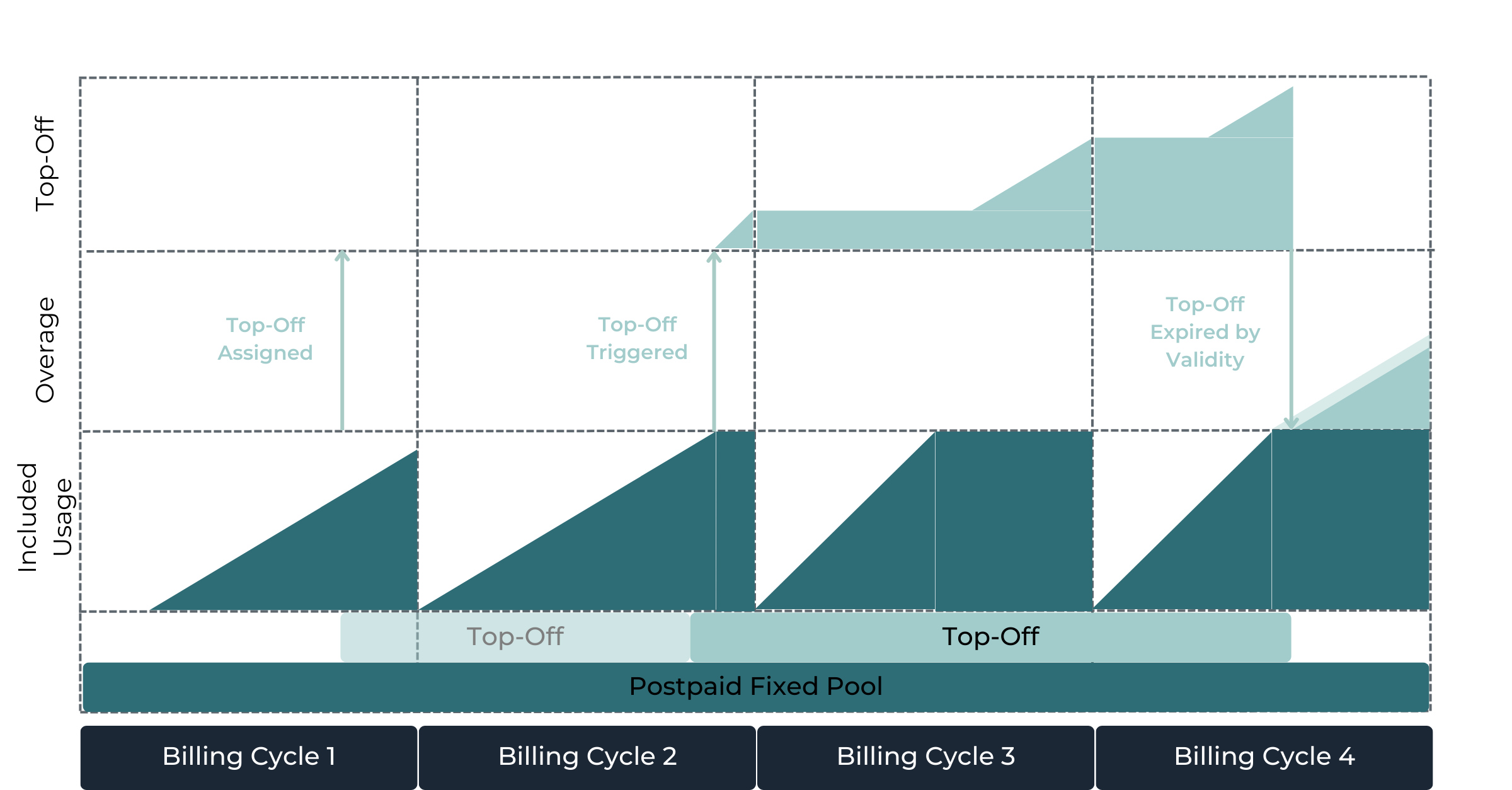
Top-Off with Auto-Renew disabled
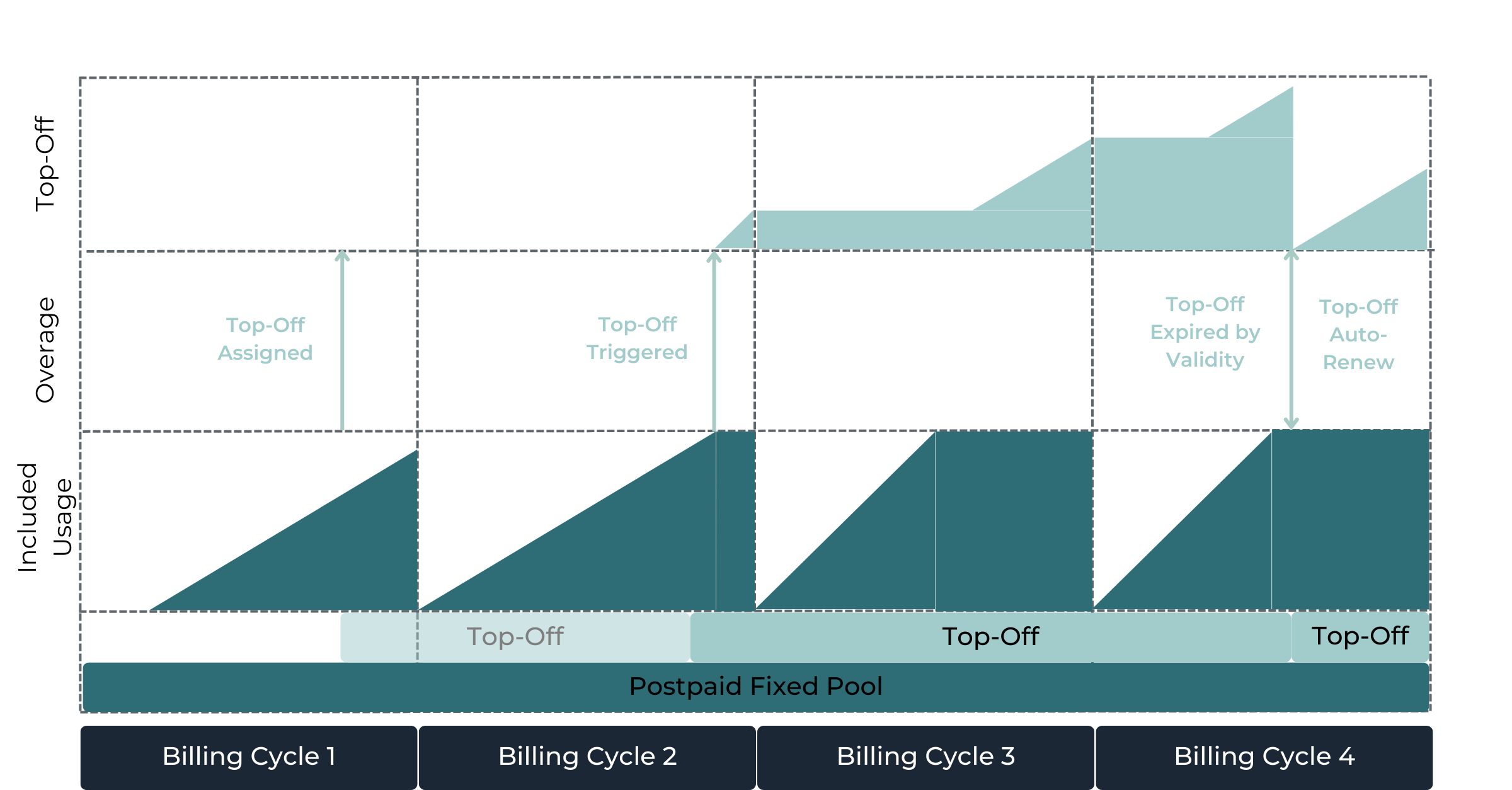
Top-Off with Auto-Renew enabled
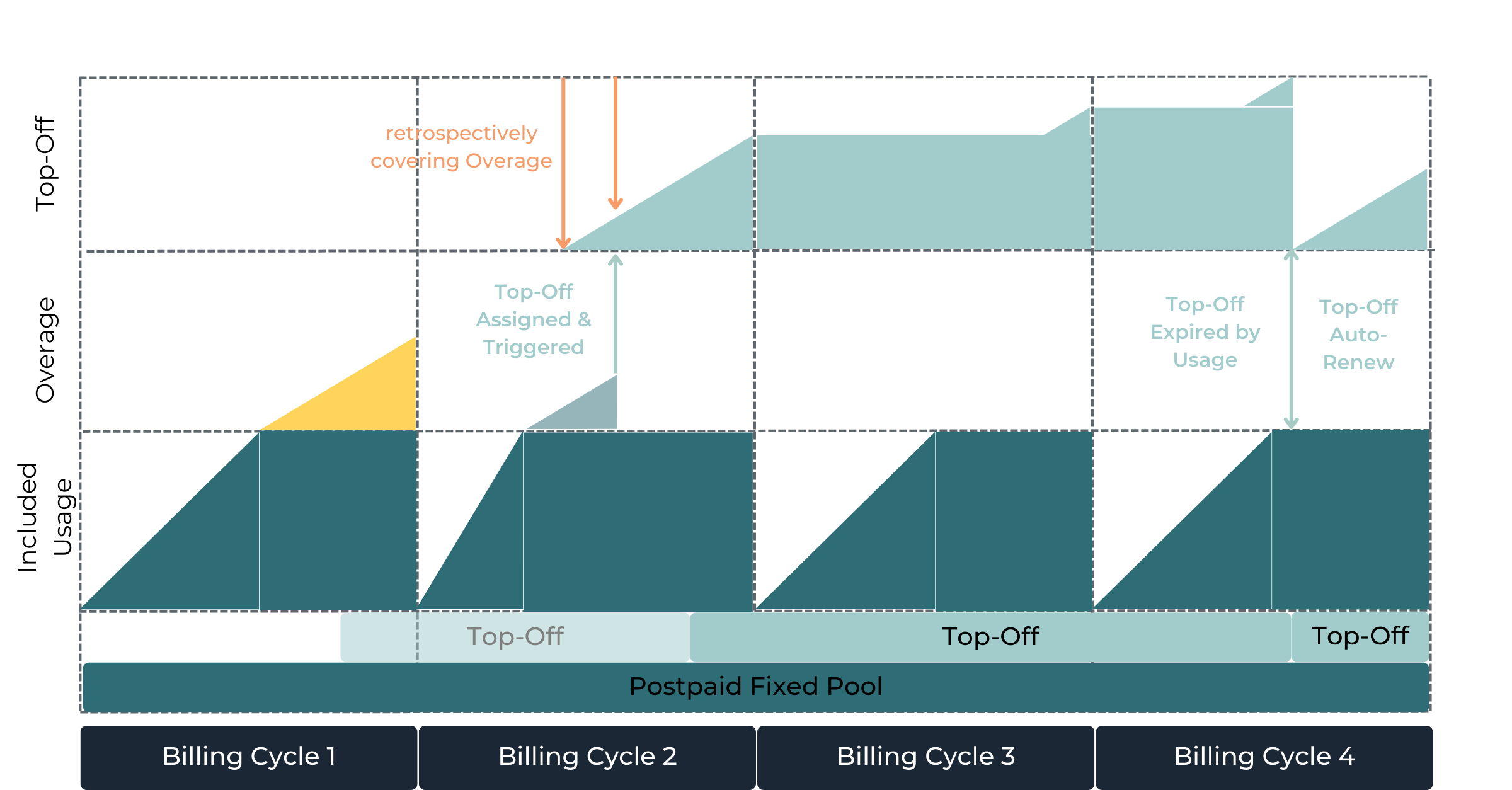
Top-Off with Auto-Renew enabled and retrospective Usage
Top-On
A Top-On is a Prepaid Zone Price Plan that
has a dedicated validity (in days), and
supports Auto-Renew capabilities.
A Top-On aims to cover Usage First and consumes any Usage from the moment it gets activated.
Top-On Price Plans can be assigned at the following levels:
Account (covers any Usage of any SIM of the given Account),
Price Plan (covers any Usage of the given Price Plan, any Postpaid Pool and Prepaid Pools with Prepaid Overage are supported), and
SIM (covers any Usage of a specific SIM Card, regardless of its Price Plan).
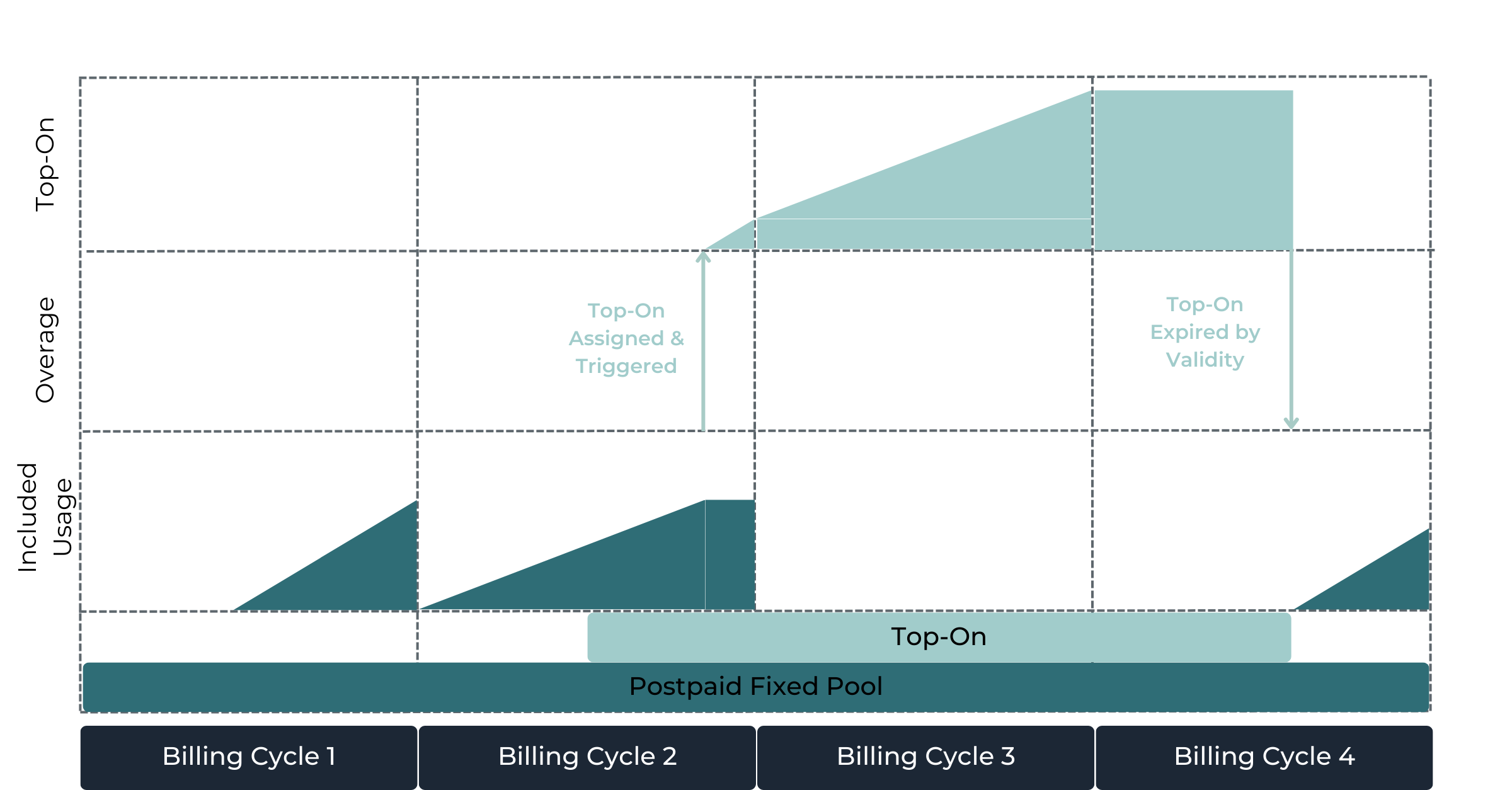
Top-On with Auto-Renew disabled
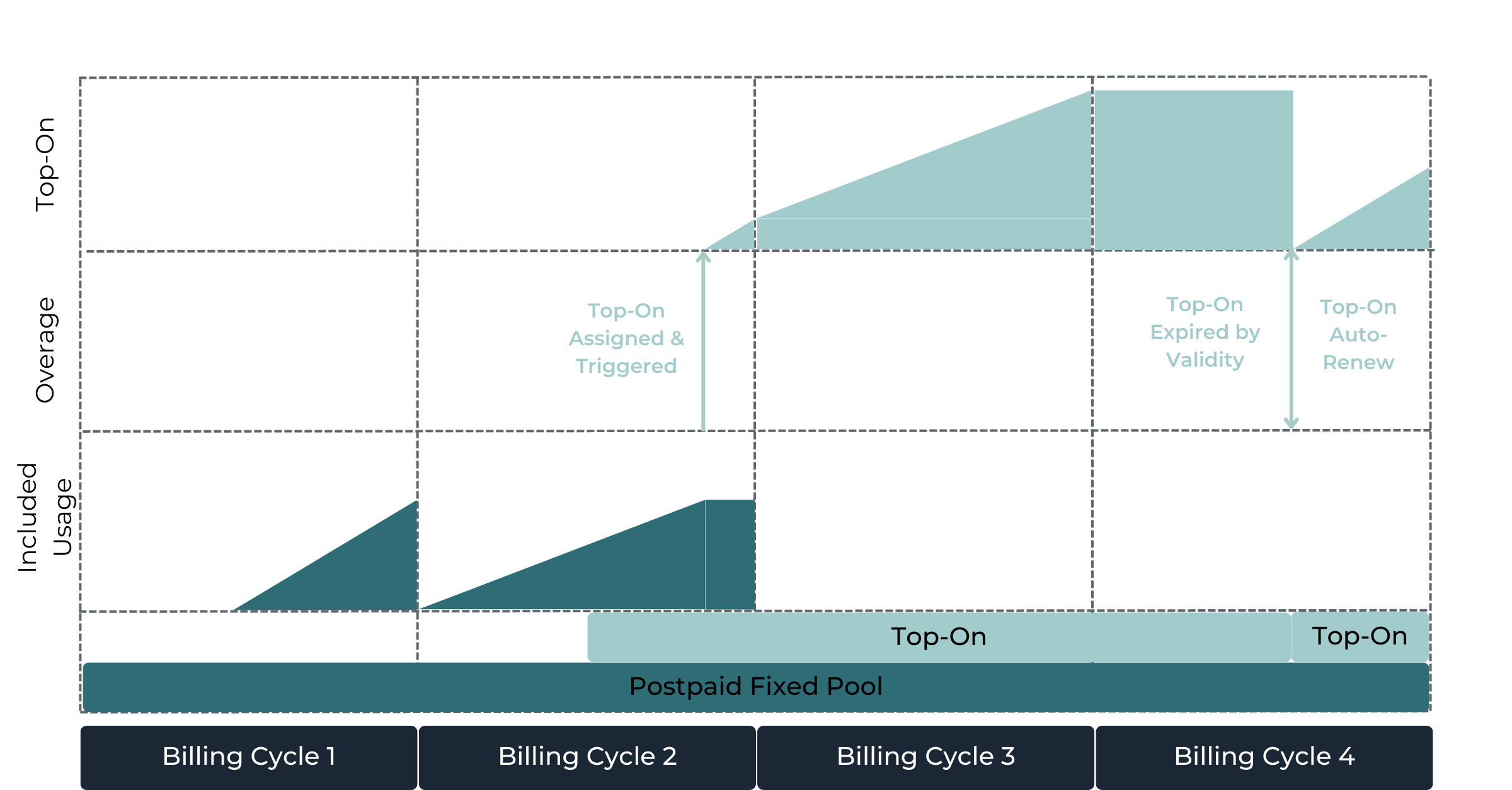
Top-On with Auto-Renew enabled
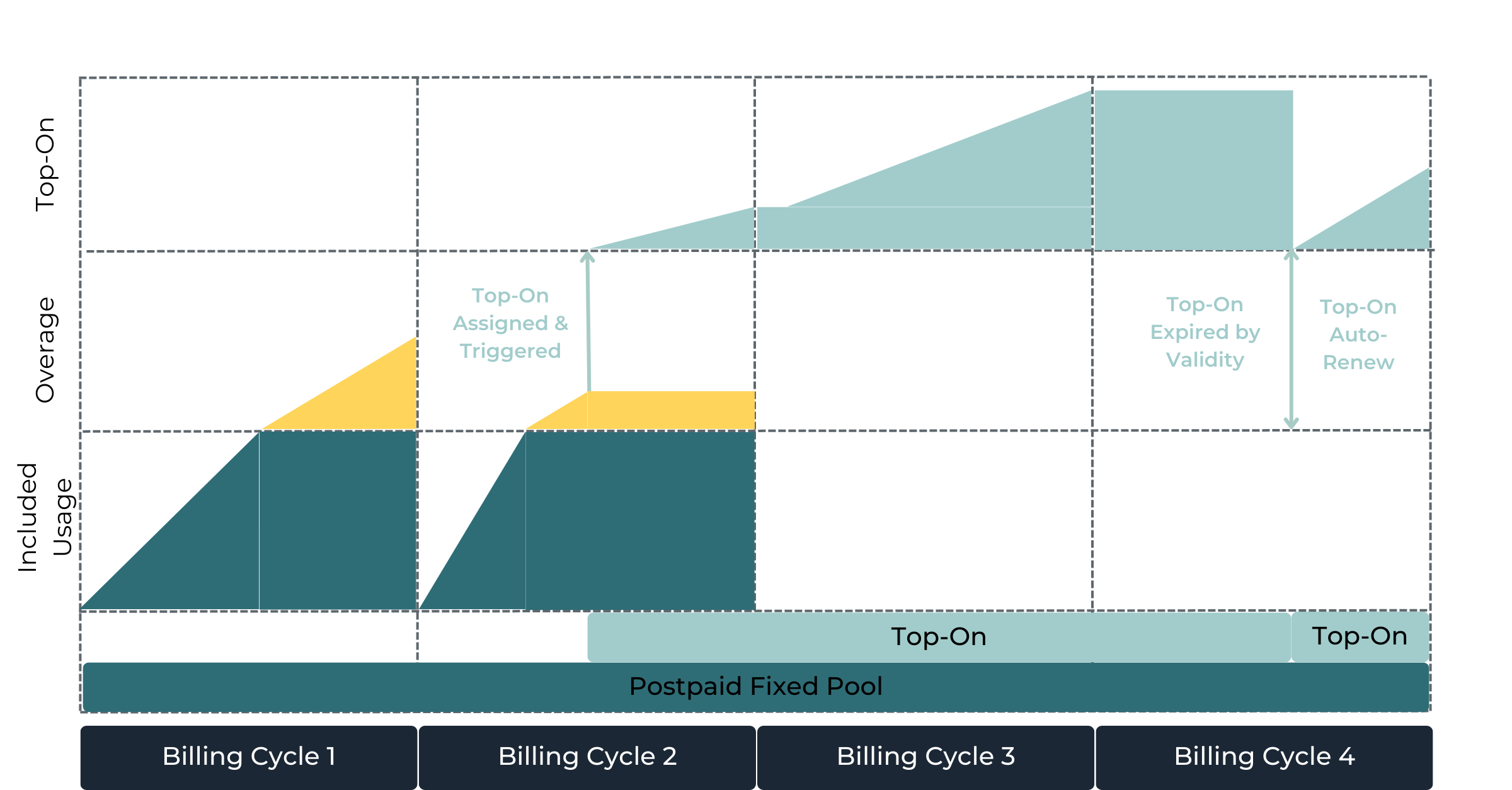
Top-On with Auto-Renew enabled
Top-Off vs Top-On
Top-On Price Plans are quite similar to Top-Off Price Plans; however, the main difference is that Top-Off only covers Overage, whilst Top-On covers any Usage (consume first).
Top-Up
A Top-Up is a Prepaid Zone Price Plan that
applies until the end of the current Billing Cycle, and
support Auto-Renew capabilities.
A Top-Up consumes any overage until consumed or expired. It also consumes overage retrospectively from the current Billing Cycle in which it gets activated.
Top-Up Price Plans can be assigned at the following levels:
Account (covers any Overage of any SIM of the given Account),
Price Plan (covers any Overage of the given Price Plan, any Postpaid Pool and Prepaid Pools with Prepaid Overage are supported), and
SIM (covers any Overage of a specific SIM Card, regardless of its Price Plan).
Self-Care via Enterprise Portal
Top-Off, Top-On & Top-Up Price Plans can be controlled both by an Account User and a CSP User via the Enterprise Portal. This allows the Account to purchase Supplemental Price Plans themselves and trigger additional costs.
Optional configurations allow the CSP to limit how much the Accounts can purchase themselves, in order to have basic control on costs and prevent a bill-shock.
Maximum Number of Self-Orders per Billing Cycle defines the maximum number of Self-Orders an Account User can perform at the Enterprise Portal for a specific Supplemental Price Plan and per Billing Cycle.
Maximum Number of Auto-Renew per Billing Cycle defines the maximum number of Auto-Renews a Supplemental Price Plan can perform per Billing Cycle. Once reached, no further Auto-Renew gets executed and the next Auto-Renew automatically executes at the beginning of the next Billing Cycle.