SIM & SIM Pool Rules (FT-1013.031)
About this document
Scope
This document provides background information as well as a functional description of the FT-1013.031 SIM & SIM Pool Rules core feature.
The described feature is supported from the release version 4.0 onwards.
This feature is part of the Automation functionality with number FN-1013.
Feature Availability
Feature Version | Available from | Summary of changes |
|---|---|---|
v1 | CMP Release 4.0 | Initial release |
Feature overview
Goals
The aim of the SIM & SIM Pool Rules feature is to allow to create and manage SIM and SIM Pool-related Rules (i.e., events that - when the event condition is fulfilled - automatically trigger one or many Actions) as a part of the CMP's extensive automation framework.
Technical Prerequisites
This feature requires the following integrations to function as intended:
Rule | Dependency |
|---|---|
SIM Rules | |
Data Session Started | Gy or RADIUS Integration |
Data Session Stopped | Gy or RADIUS Integration |
Data Sessions Count - 24hrs |
|
Data Sessions Count - Billing Cycle |
|
Data Usage - 24hrs |
|
Data Usage - Billing Cycle |
|
Data Usage in Country - Billing Cycle |
|
Data Usage in Zone - Billing Cycle |
|
Data blocked due to Security Profile violation | Gy or RADIUS integration |
eSIM Profile Status Change | eSIM Notification Integration |
Network Registration | SS7 / Signalling Integration |
Network Registration in Country (first registration) | SS7 / Signalling Integration |
Network Registration in Zone (first registration) | SS7 / Signalling Integration |
Network Registration in Network (first registration) | SS7 / Signalling Integration |
No Data Sessions - 24hrs |
|
No Data Sessions - X days |
|
No Data Sessions – Billing Cycle |
|
No SMS Sessions – 24hrs |
|
No SMS Sessions – Billing Cycle |
|
No Voice Sessions – 24hrs |
|
No Voice Sessions – Billing Cycle |
|
Not Connected – 24hrs |
|
Not Connected – Billing Cycle |
|
SIM Billing Status Changed |
|
SIM Custom Attribute Changed |
|
SIM IMEI Changed | Gy or RADIUS Integration |
SIM Location Change |
|
SIM MSISDN Changed | Gy or RADIUS Integration |
SIM Price Plan Changed (Rate Plan Changed) |
|
SIM Price Plan Expiration |
|
SMS Count - 24 hrs |
|
SMS Count - Billing Cycle |
|
SMS Count in Country - Billing Cycle |
|
SMS Count in Zone - Billing Cycle |
|
SMS blocked due to Security Profile violation | Ro SMSC integration |
Voice Duration - 24 hrs |
|
Voice Duration - Billing Cycle |
|
Voice Duration in Country - Billing Cycle |
|
Voice Duration in Zone - Billing Cycle |
|
Voice blocked due to Security Profile violation | Ro Voice integration |
Pool Rules | |
Pool Data Usage - Billing Cycle |
|
Pool SMS Usage - Billing Cycle |
|
Pool Voice Usage - Billing Cycle |
|

All SMS Usage Rules are available either for MO or MT SMS. These Rules can be configured in the same way for both types of SMS.
All Voice Usage Rules are available either for MO or MT Voice. These Rules can be configured in the same way for both types of Voice.
Assumptions
Minimum of offline charging.
Operation of the Rules assumed that Offline CDRs are available in a timely manner and it is recognised that the Rule will not be triggered in real-time.
SMS and Voice will only support the MT rules if there are MT events (Ro) or CDR (offline) records.
The needed fields are included in the event/CDRs, e.g. IMEI is included in the Gy or RADIUS messages for the “SIM IMEI Changed” Rule. For all Country and Zone triggers the event/CDR must include Country and Network information.
For Session Count in offline charging, the CDRs must contain information about the session.

The above prerequisites reflect a typical setup.
Depending on the customer's existing infrastructure, business processes, or regulatory environment, additional integrations or configurations may be necessary to ensure full compatibility and optimal performance.
Functionality of the feature
Basic Concepts of Automation Rules
CMP provides an extensive automation framework that is based on three basic elements: Triggers, Rule Filters, and Actions.
Triggers/Rules
Note: The terms Rules, Triggers, and Trigger Events, respectively the corresponding type definitions (Rule Types and Trigger Types) are used synonymously.
Rules define events that - when the event condition is fulfilled - automatically trigger one or many Actions. Event conditions can be related to the following two CMP objects and the Rule Type explicitly determines the object that is linked to the related event condition:
SIM Cards (~ SIM Rules)
Rule Triggers related to SIM Cards are called ‘SIM Rules'. Currently, the majority of CMP Rules are related to SIM Cards (Rule Triggers related to SIM Care are displayed on the of the diagram overview diagram below, indicated by Monitoring Target 'SIM’)
Examples
Trigger Condition 1: The Billing Status of a SIM Card has changed. (Rule Type: “SIM Billing Status Changed“)
Trigger Condition 2: The SIM Card’s data consumption - during the current 24 hour period - exceeds a given threshold. (Rule Type: “Data Usage - 24hrs“)
SIM Pools (~ Pool Rules)
Correspondingly Rule Triggers validating Trigger conditions on Pool level are called 'Pool Rules' (see Rules at the bottom of the diagram)
Example
Trigger Condition: The aggregated number of SMS messages - in the current Billing Cycle - of all SIM Cards in the Pool exceeds a given threshold. (Rule Type: “Pool SMS MO Usage - Billing Cycle“)
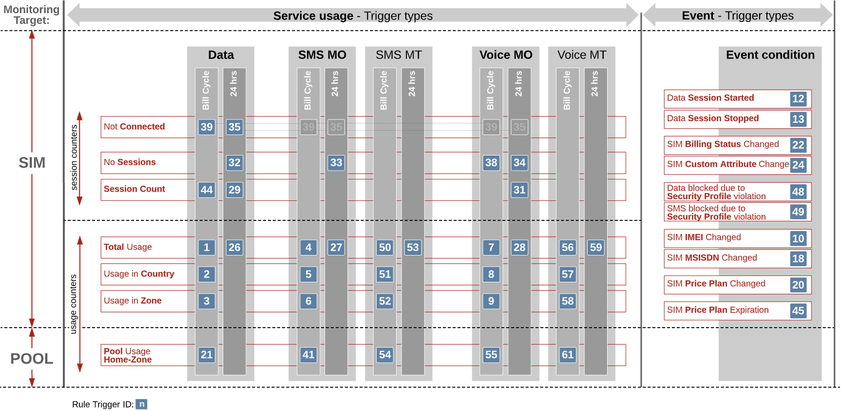
CMP Rule Triggers Overview
Rule Filters
Rule Filters represent specific filter criteria that allow to limit the set of CMP objects that the event condition shall be evaluated on.
Note that Rule Filters are currently only applicable for SIM Card related Rules Triggers and not for ‘Pool Rules’.
Example
Filter Criteria 1: Apply the given trigger condition only for SIM Cards with a given Billing Status, e.g. ‘In Billing’. (Filter Type: “Subscriber Status“)
Filter Criteria 2: Apply the given trigger condition only for SIM Cards that have a specific Active Price Plan assigned. (Filter Type: “IMSI Active Price Plan“)
Each Rule definition can have an arbitrary number of Filters defined, and in case more than one Filter has been defined the corresponding filter criteria will be linked according to the following logical rules:
filter criteria from different type will be linked by AND, and
filter criteria from the same type will be linked by OR.
Example
Apply the trigger condition only for SIM Cards which have a given Billing Status AND which have Price Plan A OR Price Plan B assigned.
In order to make the trigger condition and the defined Rule Filters effective the Rule needs to be activated since all Rules are initially created in INACTIVE status. However, activated Rules can no longer be changed nor are any changes to Filters or additional Filter definitions allowed. To modify a Rule it must be deactivated first.
Actions
Actions represent CMP operations that can be triggered once a Rule condition is met. A Rule can have one or many Actions assigned, and if a Trigger condition is met, all of the assigned Actions will be executed in the order given by the sequence numbers (in ascending order) set during the assignment process.
For more details on Actions, please see the following feature description: FT-1013.004 Actions
Basic Flow for defining Automation Rules
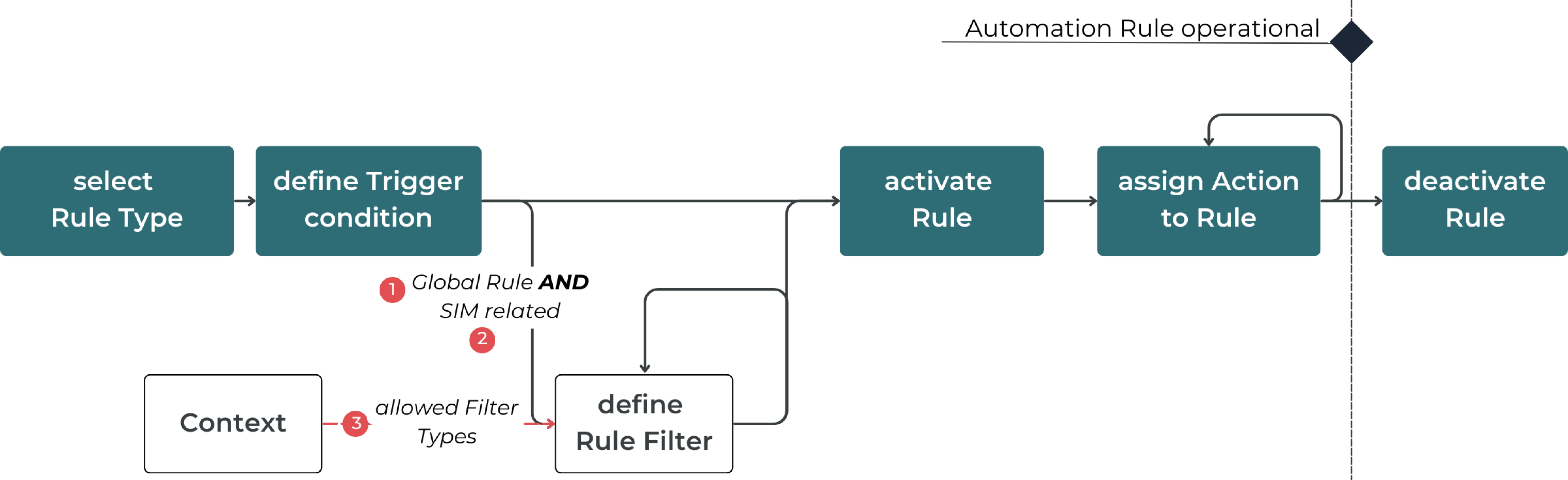
The following diagram displays the basic sequence of steps to define an Automation Rule.
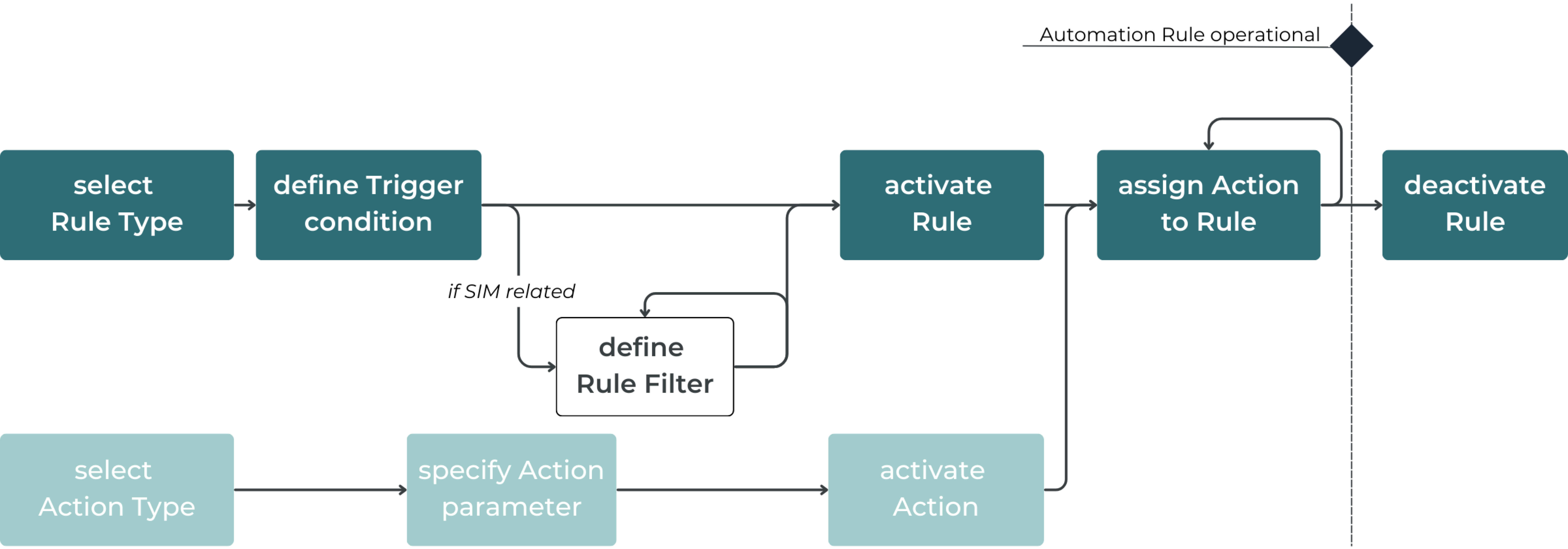
SIM Rules
This section describes details applicable to SIM Rules and lists all available related Trigger Types.
Scope of the Rule
The scope of each SIM Rule is defined as All SIM Cards in Context. This scope comprises by default the greatest possible number of SIM Cards in the given context.
The following diagram illustrates the Rule scope for each SIM Rule with scope value All SIM Cards in Context defined in the following contexts:
Rules defined on the Root level comprise all possible 13 SIM Cards (A.1-C.3) accessible by the CSP User.
Rules defined for example in the context of Account B apply per default to all 6 SIM Cards (B.1-B.6) of Account B.
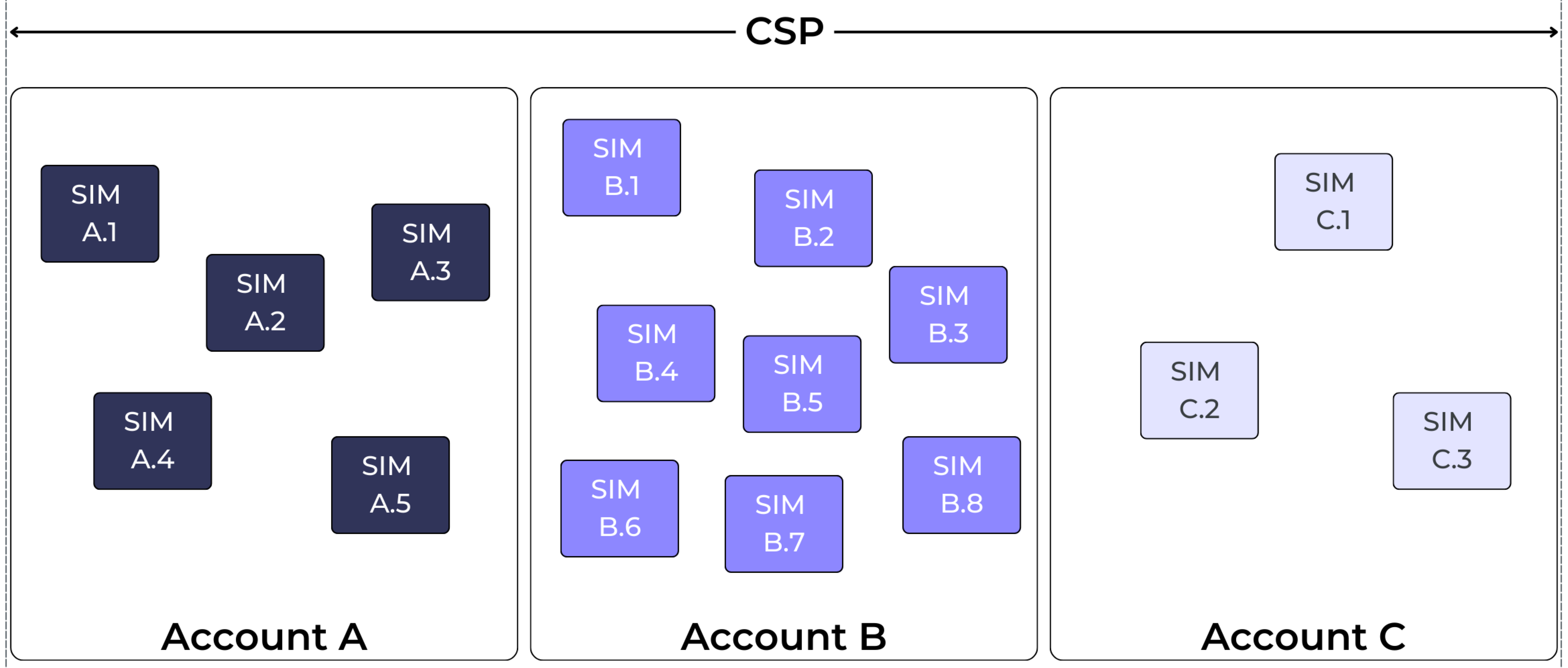
SIM Rule Types
Note that Voice-related Rule Types described below are only available when the Voice feature is enabled on the CMP instance.
The following table explains the scope of each available SIM Rule Type.
SIM Rule Type | Description |
|---|---|
Data Session Started | The device has successfully started a data connectivity session with a cellular network. |
Data Session Stopped | The data connectivity session between the device and cellular network has ended. |
Data Sessions Count - 24 hours | User-defined parameter for the total number of data sessions within 24 hours. |
Data Sessions Count - Billing Cycle | User-defined parameter for the total number of data sessions within the Billing Cyce. |
Data Usage - 24 hours | Data usage of the SIM within the current 24 hours exceeds the customer set limit. |
Data Usage - Billing Cycle | Data usage of the SIM within the Billing Cycle has exceeded the user-set limit. |
Data Usage in Country - Billing Cycle | Data usage of the SIM in a Country has exceeded the user-set limit within the Billing Cycle. |
Data Usage in Zone - Billing Cycle | Data usage of the SIM in a Location Zone has exceeded the user-set limit within the Billing Cycle. |
Data blocked due to Security Profile violation | Data services of the SIM are blocked due to a Security Profile violation. |
eSIM Profile Status Change | eSIM Profile Status Change notification received from external system. |
Network Registration | The SIM has registered to a mobile network. |
Network Registration in Country (first registration) | The SIM has registered to a mobile network in a specific country for the first time within the monitoring period. |
Network Registration in Zone (first registration) | The SIM has registered to a mobile network within a defined Location Zone for the first time within the monitoring period. |
Network Registration in Network (first registration) | The SIM has registered to a specific mobile network operator for the first time within the monitoring period. |
No Data Sessions - 24 hours | No data connectivity session has been established with a cellular network within the last 24 hour period. |
No Data Sessions - X days | No data connectivity session has been established within a defined number of days (1-365). The monitoring starts at midnight the day after the activation of the Rule. Sessions without usage are still counted as sessions, as the trigger logic doesn't differentiate between sessions with and without usage. |
No Data Sessions – Billing Cycle | No data connectivity session has been established with a cellular network within the last Billing Cycle. |
No SMS Sessions – 24 hours | No SMS session has been established within the last 24 hour period. |
No SMS Sessions – Billing Cycle | No SMS session has been established within the last Billing Cycle. |
No Voice Sessions – 24 hours | No voice session has been established within the last 24 hr period. |
No Voice Sessions – Billing Cycle | No voice session has been established within the last Billing Cycle. |
Not Connected – 24 hours | SIM Card has not established a connection to a mobile network within 24 hours. |
Not Connected – Billing Cycle | SIM Card has not established a connection to a mobile network within the past Billing Cycle |
SIM Billing Status Changed | Billing Status of the SIM has changed. Source- and Target Status are user-defined. |
SIM Custom Attribute Changed | Value of a particular Custom Field associated with the SIM has changed. |
SIM IMEI Changed | IMEI of a Device with a MAVOCloud-managed SIM assigned has changed. |
SIM Location Change | Cell ID of the SIM Card changed during or across data sessions. |
SIM MSISDN Changed | MSISDN associated with the SIM has changed. |
SIM Price Plan Changed (Rate Plan Changed) | Price Plan associated with the SIM has changed. |
SIM Price Plan Expiration | Prepaid Price Plan of a SIM has expired, either data or time limit has been reached. |
SMS Count - 24 hours | SMS usage of the SIM within the current 24 hours has exceeded the customer set limit. |
SMS Count - Billing Cycle | SMS usage of the SIM within the Billing Cycle has exceeded the User-set limit. |
SMS Count in Country - Billing Cycle | SMS usage of the SIM in a Country within the Billing Cycle has exceeded the User-set limit. |
SMS Count in Zone - Billing Cycle | SMS usage of the SIM in Location Zone within the Billing Cycle has exceeded the User-set limit. |
SMS blocked due to Security Profile violation | SMS services of the SIM are blocked due to a Security Profile violation. |
Voice Duration - 24 hours | Voice usage of the SIM within the current 24 hours exceeds the customer set limit. |
Voice Duration - Billing Cycle | Voice usage of the SIM within the Billing Cycle has exceeded the user-set limit. |
Voice Duration in Country - Billing Cycle | Voice usage of the SIM in a Country has exceeded the user-set limit within the Billing Cycle. |
Voice Duration in Zone - Billing Cycle | Voice usage of the SIM in a Location Zone has exceeded the user-set limit within the Billing Cycle. |
Voice blocked due to Security Profile violation | Voice services of the SIM are blocked due to a Security Profile violation. |
Note:
All SMS Count Rules (Count - 24 hrs, Count - Billing Cycle, Count in Country - Billing Cycle, Count in Zone - Billing Cycle) are available either for MO or MT SMS. The Rules can be configured in the same way for both types of SMS.
All Voice Duration Rules (Duration - 24 hrs, Duration Billing Cycle, Duration in Country - Billing Cycle, Duration in Zone - Billing Cycle) are available either for MO or MT Voice. The Rules can be configured in the same way for both types of Voice.
Pool Rules
As described above this section describes details related to Pool Rules (event conditions are related to SIM Pools).
Pool Rule Types
Note that Voice-related Rule Types described below are only available when the Voice feature is enabled on the CMP instance.
The following table explains the scope of each available Pool Rule Type.
Condition | Explanation |
|---|---|
Pool Data Usage - Billing Cycle | User-defined parameter for a specific volume of data usage within a Pool Price Plan in Home Zone. |
Pool SMS Usage - Billing Cycle | User-defined parameter for a specific amount of SMS within a Pool Price Plan in Home Zone. |
Pool Voice Usage - Billing Cycle | User-defined parameter for a specific volume of Voice usage within a Pool Price Plan in Home Zone. |
Note:
All SMS Usage Rules are available either for MO or MT SMS. The Rules can be configured in the same way for both types of SMS.
All Voice Usage Rules are available either for MO or MT Voice. The Rules can be configured in the same way for both types of Voice.
Percentage based Pool Triggers
In the case of Pool Rules, CMP allows to specify absolute or percentage values as trigger thresholds. The use of percentage values as a threshold enables monitoring of the overage use case for both dynamic and static SIM Pools. The current Pool size (i.e. 100 percent) in the Home Zone for the particular service (i.e. Data, SMS MO, SMS MT, Voice MO, Voice MT) serves as the basis for the percentage thresholds.
Note:
Percentage based Pool Triggers are only applicable for threshold Pool Rules. Currently, all available Pool Rules define threshold trigger conditions (see table above), when adding new Pool rules this definition has to be taken into account.
Assigning Actions to Pool related Triggers
Unlike for SIM related Triggers, in the case of a Pool related Trigger the Action target is not implicitly given by the SIM that triggered the Action. Currently, the following principles apply.
The Action target of any Pool related Trigger is the SIM Card in the Pool that caused the Trigger condition to become true.
Example
Action from Type “Change SIM Billing Status” with Action Repetition Type: ONCE is assigned to a Pool related threshold Trigger (e.g. “Pool Data Usage - Billing Cycle”)
Once the aggregated data usage of the Pool exceeds the given threshold the “Change SIM Billing Status” Action will be applied to the SIM Card that contributed the usage greater than the threshold.
As the Action Repetition Type is recorded on SIM level the Action assigned to the Pool related Trigger will still be triggered after the first occurrence even if the Action Repetition Type has been set to ONCE, as long as another SIM Card causes the Trigger condition (e.g. Pool size >= threshold) to become true. This means that not only one (the first) SIM Card in a Pool will be suspended by this mechanism, but every SIM Card that attempts to consume data after the threshold has been exceeded.
Example The following diagram shows an example scenario for a Pool (Pool C) with 3 SIM Cards: 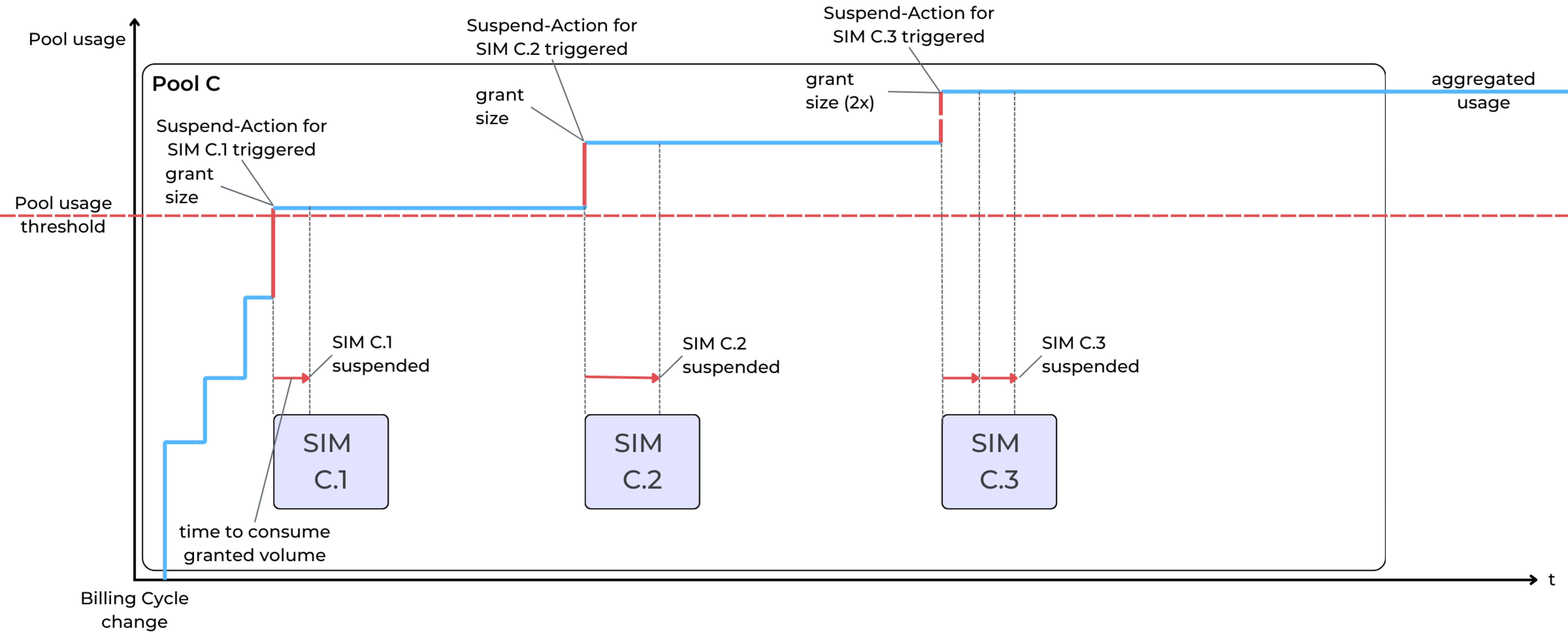 The described scenario assumes (for SIM C.1 and C.2) that the CMP Suspend-operation via Suspend Service Profile has been successfully completed before the related SIM Card requests the next data grant. This might not be the case for high-volume SIM Cards consuming data in a short time span, thus contributing more than one grant size to Pooled data usage (see SIM C.3). |
|---|
Context of Automation Rules
Automation Rules follow the context concept applicable to all objects managed in the Enterprise Portal, therefore each Rule Trigger and each Action is created either in the context of
the Root context (in case the Portal User has CSP Admin credentials),
an Account (if the Portal User owns Account login credentials).
As usual, the context defines the owner of the object, but in relation to Automation Rules, it specifically defines the initial scope of a Rule Trigger (i.e. which SIM Cards are monitored for the events defined).
Rule Triggers defined on the Root level are correspondingly applicable to all the SIM Cards accessible by the CSP in the Enterprise Portal. Practically this means ALL SIM Cards that have been assigned to any Account are visible in the Enterprise Portal.
Rule Triggers defined on Account level are applicable for all the SIM Cards assigned to the corresponding Account (and therefore visible to an Account User).
Rule Context and Filters
The context of a given SIM Rule with scope value ‘All SIM Cards in Context’ defines the default scope as the starting point for defining Rule Filters, however, not all available Filter Types are applicable for all contexts.
Example
Filter Type “Account Status“ (apply the Rule Trigger only to SIMs in an Account with a given Account Status) is only applicable for CSP-wide Rules.
Filter Type “IMSI Active Price Plan“ (consider only SIMs with a specific Price Plan assigned) only makes sense in the context of a given Account.
The following table describes which Filter Types are available on Root and/or Account level.
Filter Name | CSP Context | Account Context |
Account | x |
|
Account-Status | x |
|
Account-Tag | x |
|
Sub-Account |
| x |
Sub-Account Status |
| x |
Subscriber Tag | x | x |
Subscriber Status | x | x |
IMSI Active Price Plan |
| x |
IMSI Active Price Plan Type |
| x |
Radio Access Type | x | x |
Custom Attribute |
| x |
Zone |
| x |
In conclusion, the application of Rule Filters depends on three factors:
Rule Filters can only be defined for SIM Rules with scope value All SIM Cards in Context, but not for SIM Rules with scope value Individual SIM Cards.
Rule Filters can only be defined for SIM-related Trigger/Rule Types (i.e. SIM Rules), Pool-related Rule Types (i.e. Pool Rules) are currently excluded from the Filter definition.
The Filter Types applicable for a SIM Rule with scope value ‘All SIM Cards in Context’ are dependent on the context of the Rule.
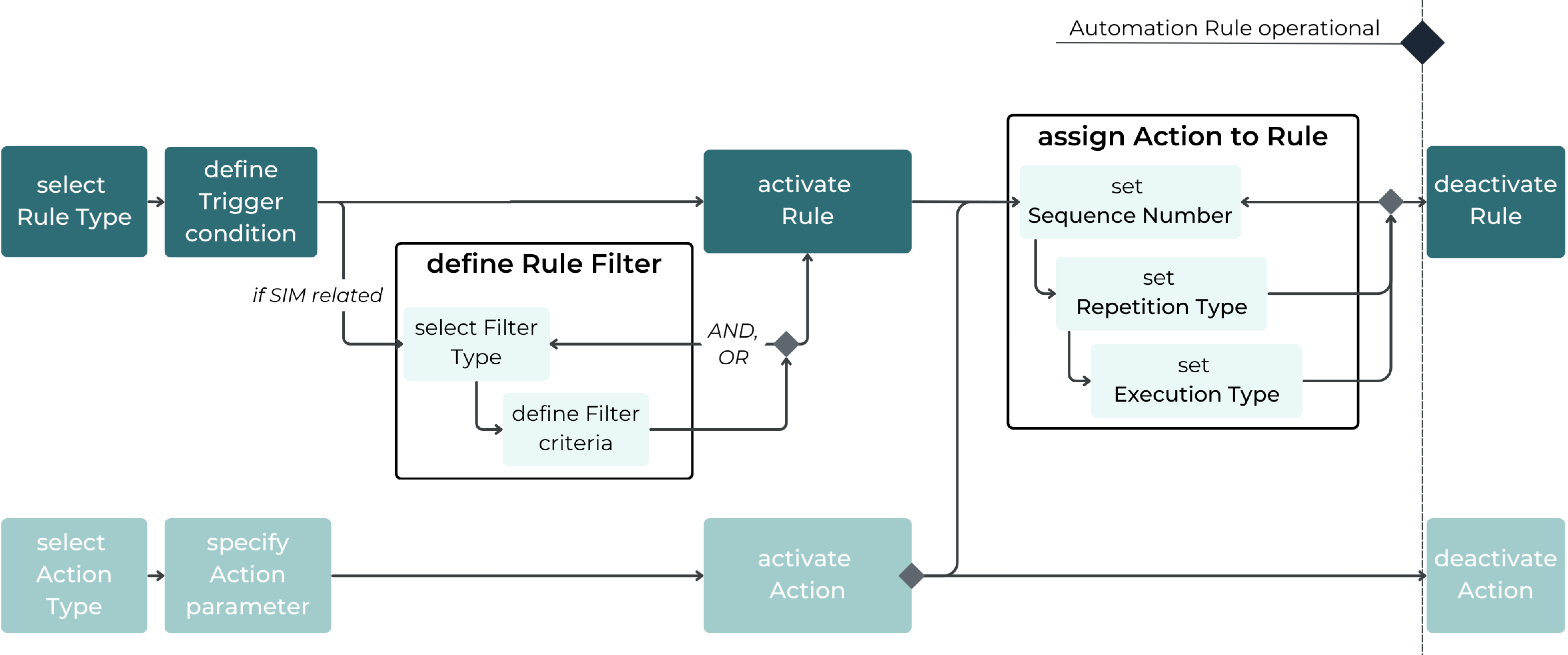
The following diagram shows the basic Rule definition workflow enriched by the three factors of Filter definition described above:
Detailed Flow for defining Automation Rules
The following diagram summarizes the steps of Automation Rules setup that have been described throughout this document.