
SIM & eSIM Onboarding (FT-1009.001)
About this document
Scope
This document provides background information as well as a functional description of the FT-1009.001 SIM & eSIM Onboarding core feature.
The described feature is supported from the release version 4.0 onwards.
This feature is part of the SIM Onboarding & Provisioning functionality with number FN-1020.
Feature Availability
Feature Version | Available from | Summary of changes |
|---|---|---|
v1 | CMP Release 4.0 | Initial release |
Feature overview
Goals
The aim of the SIM & eSIM Onboarding feature is to load SIMs into CMP, into the SIM Inventory, and ready for assignment to Accounts. In order to do this, the SIM must be loaded with key data items, such as the SIM Product. This key reference data is created through this feature.
Technical Prerequisites
This feature does not require any specific technical integrations for standard operation.

While no direct dependencies apply in typical scenarios, additional integrations or configurations may be necessary depending on the customer's infrastructure, business processes, or regulatory environment.
Functionality of the feature
Note that eSIM-specific functionality described here is available only when the eSIM feature is enabled on the CMP instance.
SIM Management in Resource Manager
Create SIM Reference Data in CMP
CMP allows CSPs to create SIM reference data that is required for loading SIM Cards into CMP using the Resource Manager.
SIM Vendor
SIM Vendors created and managed in the Resource Manager represent SIM Card producers, companies that will provide the physical portion of SIM Sales Products.
SIM Branding
SIM Branding is a concept of applying graphic templates (i.e. custom text, color, or image designs) to SIM Cards. Various branding designs can be created for Service Providers or individual Accounts.
SIM Product
SIM Products are physical SIM Cards that Service Providers can sell to their customers. SIM Products are identified by the SIM Provider Part Number, a user-defined identifier.
A SIM Product defines
the type of the SIM (SIM, eSIM),
the SIM form factor and physical parameters, and
if automatic MSISDN and IMSI assignment is required.
SIM Products link to the
SIM Provider,
Network Interface, and
SIM Branding.
SIM Products will also link to the SIM Sales Product and therefore to Accounts as well.
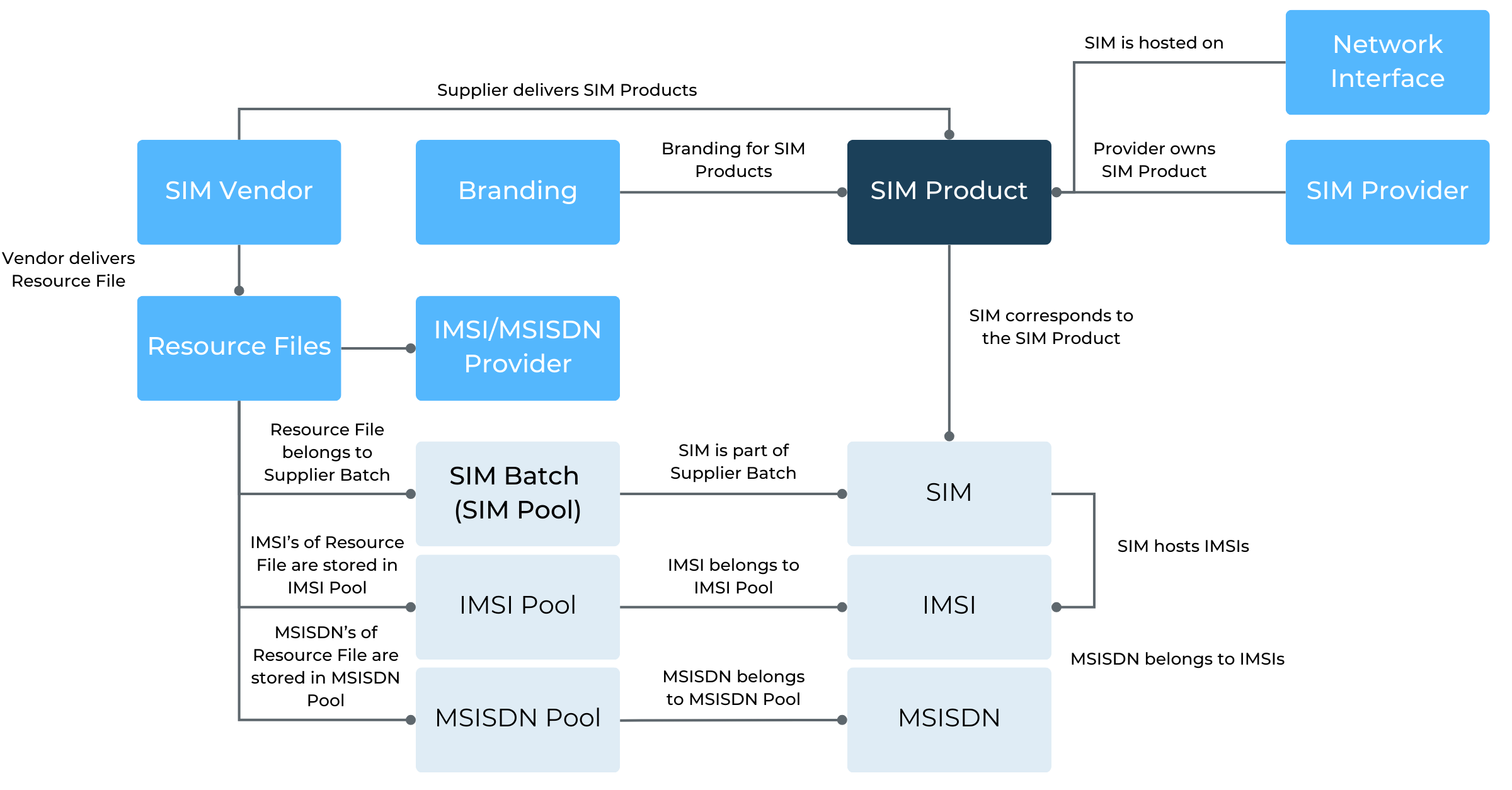
SIM Product relationships
SIM Ordering Process
The SIM Ordering Process is described in the diagram below. Note that CMP plays no role in the SIM ordering process, except at the end of the shown process where the SIM Out File is loaded into CMP.
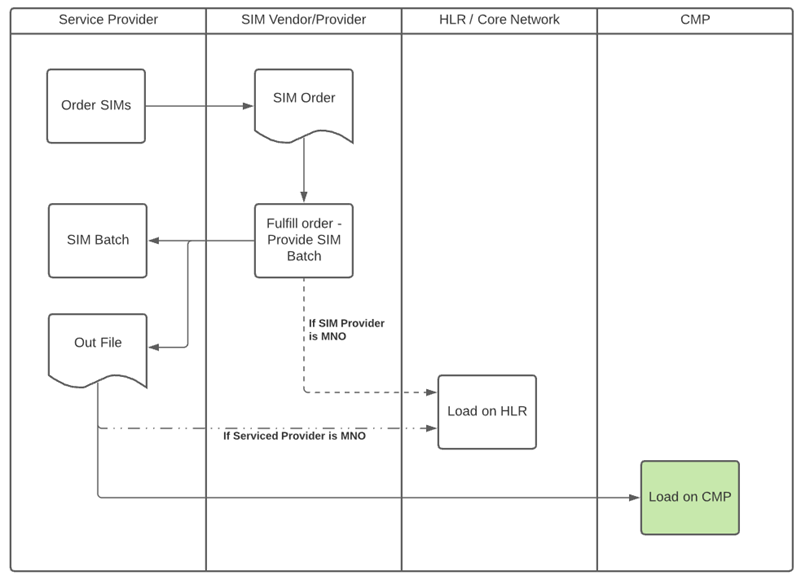
Upload SIM Files from SIM Vendor
SIM Cards managed by the Service Provider are loaded into the CMP using SIM Upload Files provided by the SIM Vendor.
SIM Batch
Before loading SIM files to CMP, SIM Batches have to be created in the Resource Manager as SIM Vendors deliver the SIM Cards in batches. The purpose of SIM Batches is to aid to determine possible production problems based on the batch relations of the SIMs and to organize the SIM Cards according to their technical specification, which is set forth by the SIM Product that is used when creating the SIM Batch.
SIM Upload File
The minimum details in the Upload File are different for the available SIM Types.
The minimum required details for
a SIM File are ICCID, and IMSI,
an eSIM File are EID, ICCID, and IMSI, and
eSIM Profile (Unassigned to EID).
The Upload Files can contain additional optional fields.
SIM File Example
var_out: ICCID/IMSI/PUK1/PUK2/PIN1/PIN2
89011702278199123456 901449876543210 111111 222222 3333 4444

Note, that the CMP validates the ICCID and IMSI on upload.
MSISDN Assignment Options
CMP provides multiple MSISDN assignment options:
MSISDN is assigned and uploaded on SIM Upload.
MSISDN is assigned to already loaded SIM Cards using a dedicated batch upload file.
MSISDN is assigned automatically by CMP at SIM Activation (SIM moves to In Testing or In Billing).
No MSISDN is assigned.
Multiple MSISDN assignment use cases can be used in a single CMP instance.
SIM Upload Completion
Once the SIM File has been loaded into CMP, a File Upload Report can be downloaded and the SIM Resource Status of the SIM Cards uploaded to CMP is set to Operator Inventory. At this point, the SIM Cards are available for assignment via the Purchase Order process.
File Upload Report Example
CSVRecord [comment=null, mapping=null, recordNumber=235,
values=[8944500310184003571, 234500010400357, 882362000300357, , , , ]]
ERROR: duplicate key value violates unique constraint "uk_sim_batch_file_import__sim_identifier"
Detail: Key (sim_identifier)=(8944500310184003571) already exists.
APIs
RM/CSP APIs are available to, e.g., upload SIM files, create SIM Products.
SIM Card Edit
The edit SIM Card feature allows the Service Providers to view all the details of their SIM Cards that have been loaded into CMP and edit selected data items. The following information is available for each SIM Card:
Identifier (ICCID of the SIM)
SIM Product
SIM Type (SIM, eSIM)
Status (Resource Status of the SIM Card)
PIN1
PIN2
PUK1
PUK2
Account (only available if in status ASSIGNED)
Purchase Order (only available if in status ASSIGNED)
Batch File (Identifier of the SIM’s batch)
However, the only piece of information that can be modified is the PIN and PUK of the selected SIM Card.