
SMS Management (FT-2002.025)
About this document
Scope
This document provides background information as well as a functional description of the FT-2002.025 SMS Management core extended feature.
The described feature is supported from the release version 5.1 onwards.
This feature is part of the Account Self-Administration functionality with number FN-2001.
Feature Availability
Feature Version | Available from | Summary of changes |
|---|---|---|
v1 | CMP Release 5.1 | Initial release |
Feature overview
Goals
The SMS Management feature in the Enterprise Portal aims to:
Allow Users to request Delivery Reports for SMS messages sent from the Connectivity Management Platform (CMP).
Present SMS messages sent from CMP and their corresponding Delivery Reports in the Enterprise Portal.
Support the request, retrieval, and presentation of Delivery Reports for SMS sent via CMP.
Enable the processing of SMS Event Data Records (EDRs) to provide a list of SMS messages sent and received by the subscriber, an indication of the status of sent SMS messages based on the Ro interface, and a configurable set of status indicators per CSP, depending on the SMS services allowed by each CSP.
Retrieve MO-AT SMS messages (i.e., SMS sent from the device to CMP short codes via the SMSC) and present them in the Enterprise Portal.
Out of scope
Account level shortcodes for AO/AT SMS
Encryption of sent and received SMS in CMP
Retrieval of SMS Delivery Reports via RestAPI
The solution will not show whether an SMS has actually been delivered
Collection and processing of SMS delivery report from the SMSC
Collection and processing of SMSC log files or similar to record and display all SMSs sent and received by the subscriber
Account level short codes for AO/AT SMS
Technical Prerequisites
This feature requires the following integrations to function as intended:
Packet Core Integration to SMPP

The above prerequisites reflect a typical setup.
Depending on the customer's existing infrastructure, business processes, or regulatory environment, additional integrations or configurations may be necessary to ensure full compatibility and optimal performance.
Functionality of the feature
Recevie SMS & Presentation in Enterprise Portal
When using the Enterprise Portal's Send SMS feature, Users can request an SMS Delivery Report. When the Request SMS Delivery Report checkbox is selected, CMP requests a Delivery Report from the SMSC when the SMS is sent.
In the SMS Management tab of the Enterprise Portal, CMP displays for each SIM the
AO-MT SMS sent via CMP,
Delivery Reports, and
MO-AT SMS sent to CMP.
A Portal Access Right (ACL) determines whether the User has access to the SMS Management tab in the Enterprise Portal.
CMP displays for each in the SIM Management tab the
Source,
Destination,
Type (AO-MT SMS, Delivery Report, MO-AT SMS),
Delivery Report requested (for AO-MT SMS only),
Timestamp,
Message Content,
Message Data Coding (Text, Binary), and
SMS Encoding (U=UTF8 string, H=hexadecimal string).
Note that CMP does not decode any binary or hexadecimal encoded SMS.
The provided information may be filtered/searched by
Type,
Date from/to,
Source,
Destination, and
Message Content (basic text search only, no hexadecimal or binary specific search).
Enterprise Portal displays a notification message that only the number of items defined in the respective configuration item is shown in the SMS Management tab.
SMS Delivery Reports
A CMP license feature determines whether or not SMS Delivery Reports can be displayed in CMP. If the feature is enabled on the CMP instance, the SMS Details tab on the SIM Grid in the Enterprise Portal is also enabled. A Portal Access Right determines whether the User has access to the SMS Management tab in Enterprise Portal (ACL).
When using the Send SMS feature CMP provides an option to request an SMS Delivery Report both via the GUI and API.
Each CMP instance is configured (SMS-STORAGE) to automatically remove SMS Delivery Reports after a predefined number of days (usually 30), and also if there are more than 100 SMS and SMS Delivery Reports stored in CMP per SIM (MAX-SMS-ITEMS).
CMP implements two daily housekeeping processes to manage the number of stored SMS Delivery Reports:
Every day, all SMS Delivery Reports older than the number of days specified in the SMS-STORAGE configuration item are deleted.
Every day, check to see if there are more SMS Delivery Reports than the value specified in the MAX-SMS-ITEMS configuration item. If there are more items, SMS Delivery Reports are deleted in chronological order, beginning with the oldest and progressing until the MAX-SMS-ITEMS value is reached.
External system users can retrieve SMS Delivery Reports from CMP via Rest API. The API can be used to retrieve all SMS Delivery Reports for the user context (e.g., Account or set of Accounts) and for individual SIM Cards (ICCID, IMSI, MSISDN, or SIM ID must be specified). Filtering by date and time, Account or transaction ID is available.
For each SMS Delivery Report received for a SIM, CMP generates a Kafka notification.
SMS Delivery Status
The SMS Delivery Status solution is based on the message flow for delivering SMS, as shown on the diagram below.
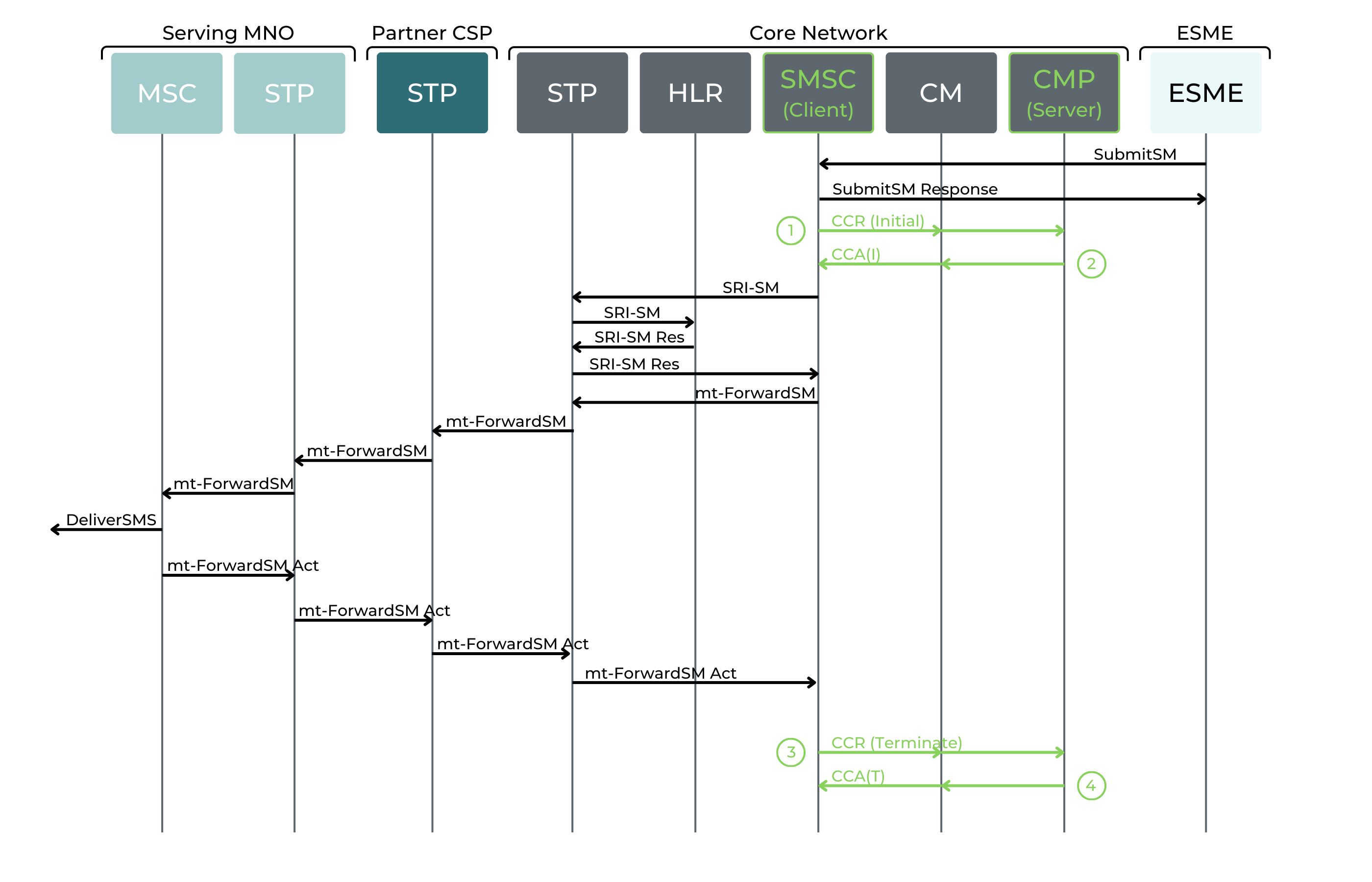
CMP generates EDRs as a result of CCR-I and CCR-T Ro messages. Note that long concatenated SMS are treated as separate SMS and separate Ro requests are made for each component SMS, furthermore each Ro transaction will be displayed separately.
The following mapping table is used to determine the indicative SMS delivery status, based on these messages.
SMS Derived Delivery Status
Ro Message | ID (API) | Success/Failed | within local core network SMS | outside of local core network SMS |
|---|---|---|---|---|
CCA-I | 1 | Success (CCA-I Success sent) | Pending | Pending |
CCA-I | 2 | Fail (CCA-I Fail sent) | Rejected | Rejected |
CCA-I | 3 | TimeOut (no CCR-T in grant duration time) | Expired(*) | Failed |
CCA-T | 4 | Success (Unit Used =1) | Delivered | Delivered/Relayed |
CCA-T | 5 | Fail (Unit Used =0) | Rejected | Failed |
CCA-T | 6 | Not Delivered (Unit Used =0) | Not Delivered | Not Delivered |
SMS Message Termination & Display
A CMP license feature determines whether or not MO-AT SMS can be displayed in CMP. If the feature is enabled on the CMP instance, the SMS Details tab on the SIM Grid in the Enterprise Portal is also enabled. A Portal Access Right determines whether the User has access to the SMS Management tab in the Enterprise Portal (ACL).
When SMS Content Encryption is enabled, only Account Users can view SMS messages in clear text. CSP Users will only see the encrypted content.
Each CMP instance is configured (SMS-STORAGE) to automatically remove MO-AT SMS after a predefined number of days (usually 30), and also if there are more than 100 MO-AT SMS stored in CMP per SIM (MAX-SMS-ITEMS).
CMP implements two daily housekeeping processes to manage the number of stored MO-AT SMS:
Every day, all MO-AT SMS older than the number of days specified in the SMS-STORAGE configuration item are deleted.
Every day, check to see if there are more MO-AT SMS than the value specified in the MAX-SMS-ITEMS configuration item. If there are more items, MO-AT SMS are deleted in chronological order, beginning with the oldest and progressing until the MAX-SMS-ITEMS value is reached.
External system users can retrieve MO-AT and AO-MT SMS from CMP via Rest API. The API can be used to retrieve all MO-AT and AO-MT SMS for individual SIM Cards (ICCID, IMSI, MSISDN, or SIM ID must be specified). Filtering by date and time, or transaction ID is available.
For each SMS received for a SIM, CMP generates a Kafka notification.