
SSO (FT-1008.007)
About this document
Scope
This document provides background information as well as a functional description of the FT-1008.007 SSO core extended feature.
The described feature is supported from the release version 4.3.5 onward.
This feature is part of the User Management functionality with number FN-1001.
Feature Availability
Feature Version | Available from | Summary of changes |
|---|---|---|
v1 | CMP Release 4.3.5 | Initial release |
Benefits
The SSO feature in MAVOCO CMP simplifies access management by allowing internal users to log in seamlessly across all CMP Portals using their existing corporate credentials through external IAM systems. It enhances security and compliance by centralizing authentication and leveraging established enterprise IAM policies. By supporting up to five external IAM integrations and mapping IAM roles to CMP User Groups, it ensures consistent role-based access control while reducing administrative overhead. This streamlined authentication experience improves usability, operational efficiency, and governance for both employees and enterprise customers.
Feature overview
Goals
The aim of the SSO feature is to provide a seamless Single Sign-On (SSO) experience for internal Users by enabling delegated authentication through external Identity and Access Management (IAM) systems using OAuth 2.0. This integration simplifies access across all CMP Portals, supports role-based access control via mapping IAM roles to CMP User Groups, and allows CSPs to connect up to five external IAM systems to streamline identity management for employees and enterprise customers.
Out of scope
Federation Authentication Flows. Only Delegation is supported in this feature.
User Account Management & Management of Accounts assigned to a User will be a manual process.
Including creation of new Accounts, and suspension and termination of existing Accounts.
New Accounts to be manually added to External IAM (integration to consume CMP Kafka and/or call CMP APIs for Account Onboarding is out of scope of this feature).
Deletion Uof users will be done through operational process:
CSP IAM: CSP will delete User in External IAM.
CMP CAS: CSP operation team will delete User in CMP CAS using CAS admin UI.
CMP Portals: User information will not be deleted from CMP Portals to maintain audit logs. User information can be anonymized.
Synchronisation of Roles between External IAM and CMP CAS.
No explicit synchronization between CSP IAM and CMP for User Group information.
Any change to the IAM Roles, e.g., changes to allowed access, must be manually made in CMP CAS to the respective User Group(s).
Any new IAM Role, will need a new mapping to be created in CMP CAS.
Prerequisites and Baseline Assumptions
The external IAM SSO integration will support delegated authentication. Federated authentication is not supported in this package.
Maximum of 5 external IAM platforms.
External IAM has defined User Roles which can be mapped to User Groups in CMP.
User access must be defined in terms of a User Rrole which can be mapped to a CMP CAS User Group.
Bespoke access for one or more Users is not supported.
The User where SSO is to be enabled must be provisioned in the External IAM.
The external IAM Users will be provisioned and updated into CMP CAS during the authentication flow.
The external IAM will be extended to provide User Profiles including:
User Role(s),
Context, i.e., Account(s) that may be accesses,
Any restrictions between User Roles and Context (e.g., Admin for Account X, Account User for Account Y).
Technical Prerequisites
This feature requires the following integrations to function as intended:
Other IT Systems - Identity Management (IdM) system

The above prerequisites reflect a typical setup.
Depending on the customer's existing infrastructure, business processes, or regulatory environment, additional integrations or configurations may be necessary to ensure full compatibility and optimal performance.
Functionality of the feature
Single Sign On (SSO)
CMP CAS Server - SSO Integration Aspects
The CMP Software can exist completely without an external IdM system. However, in many cases, the CSP has an existing IAM and especially wants to offer internal users a single-sign-on user experience.
The integration of external parties like customers makes the whole process much more complicated and fragmented. In most cases, portals for private customers do not play a major role in systems like our CMP, however, the CSP could have existing portals for business customers.
Another use case could be the merging of different CMP Platforms, for example, customers who have an Account in Jasper could also register with the same identity to our CMP Software.
The following defines the scope of this SSO integration package. This integration package supports delegated authentication only for a maximum of 5 external IAM platforms.
The scope of the integration package is show in the following diagram:
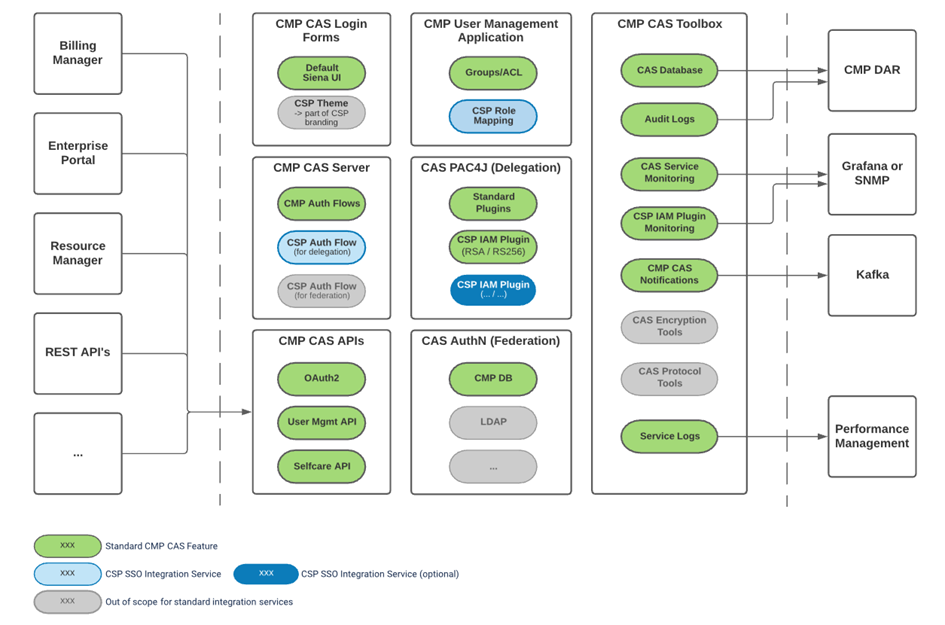
CMP CAS Solution currently supports SSO integration via authentication delegation (via OAuth 2.0) and SSO integration to external IAMs via authorization federation is out-of-scope.
SSO integrations based on CMP CAS solution
The following diagram summarizes
the required CMP CAS components,
the related CMP CAS standard functionality (see CMP CAS Architecture), and
the functionality that requires integration services for an SSO integration.
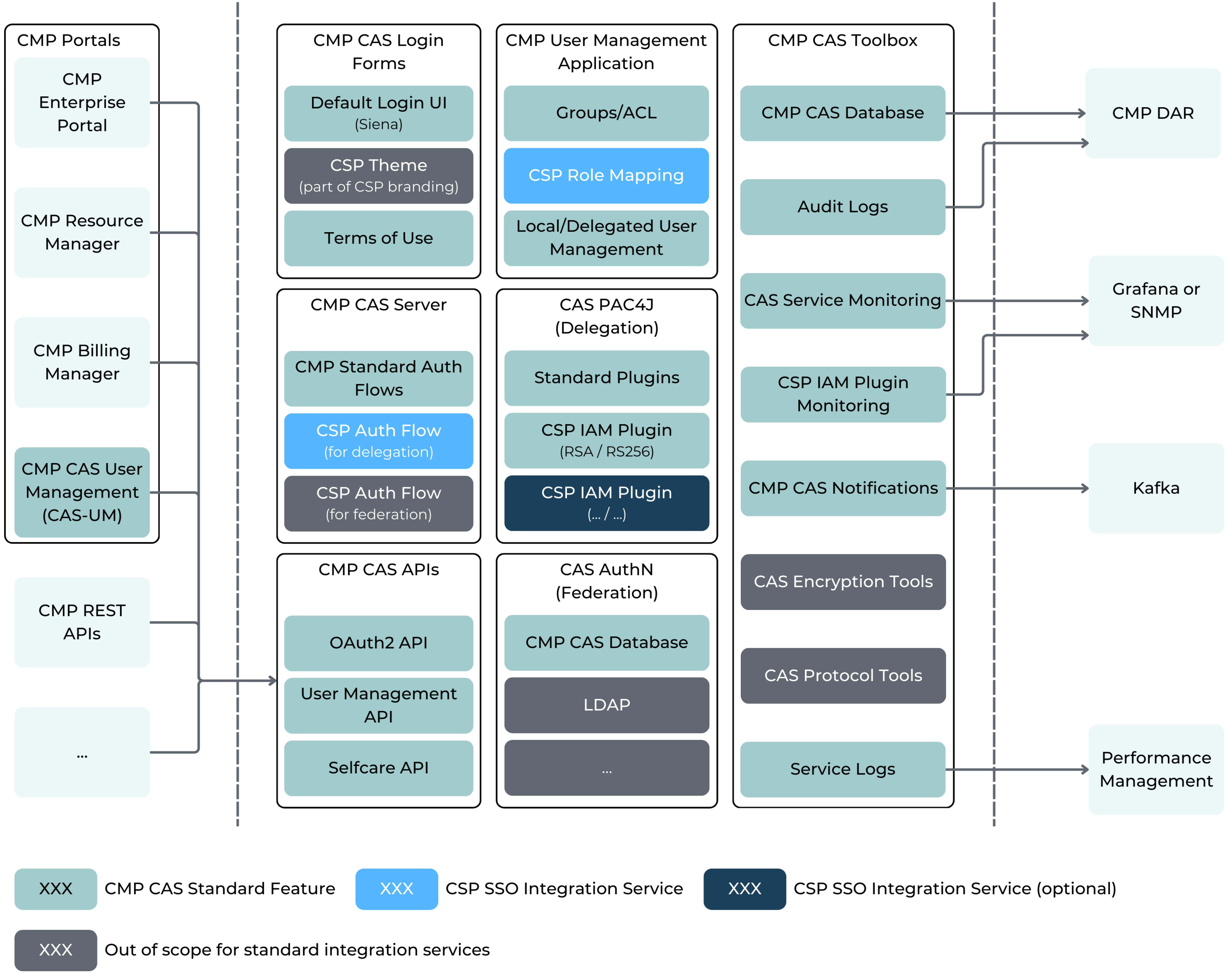
CMP CAS SSO integration components
SSO Integration Services | CMP CAS Component | Purpose | Comment |
|---|---|---|---|
CSP Auth Flow (for delegation) | CMP CAS Server | CMP Provides default login flow only (see below) based on CMP User Database and CMP Login Screens. For CSP having its own process, CSP CAS Service flows have to be configured. | This is the main customization service for integration to external IAMs. |
CSP Role Mapping | CMP User Management Application | CMP provides its own User and Access Rights Management web application (='CMP User Management Application'). Initial setup is required to enable access to CMP Services:
| This is required if external IAM is based on authorization via Roles. |
CSP IAM Plugin | CAS PAC4J (Delegation) | CMP CAS uses the PAC4J framework to delegate authentication. Currently supported token encryption and signature verification (RAS/RS256):
| The PAC4J project provides some standard plugins for the most common platforms (see https://www.pac4j.org/docs/clients/oauth.html ). |
Single Sign-On for all Portals (EP, RM, and BM)
The following diagram shows the standard sequence of OAuth API calls for SSO implementation on each Portal (see as well the diagram for CMP CAS Architecture above):
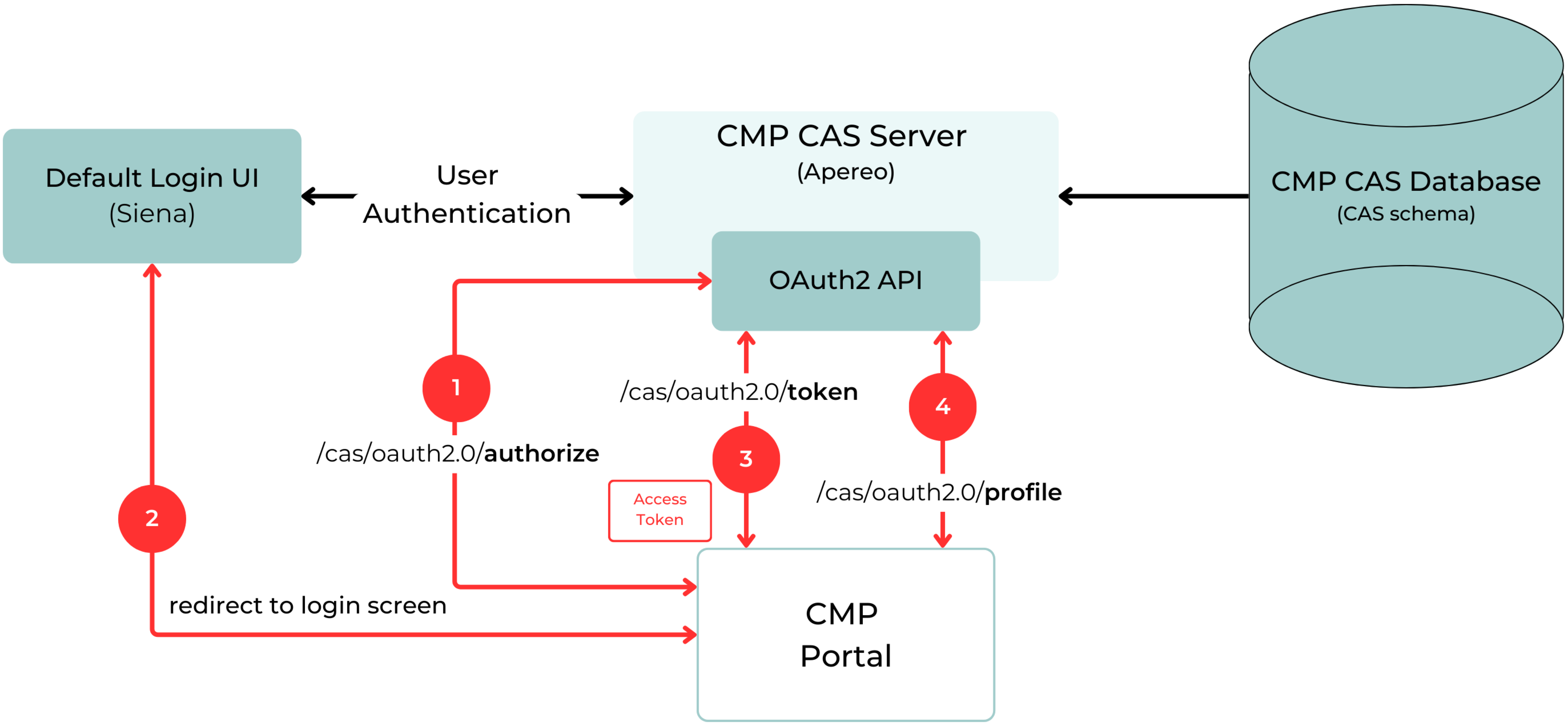
Standard CMP SSO authentication flow
Authentication via the local login screen is replaced by redirection to the common SSO login screen for the CMP CAS Solution.
This replaces local authentication and authorization by CAS SSO and is applicable to all CMP Portals (EP, RM, and BM), also including the CMP User Management Application.
Identity Federation and External IdM Support
CMP provides the option to integrate into a maximum of 5 external IAM (Identity and Access Management) Systems in order to allow CSPs to facilitate Single Sign On (SSO) for their employees and enterprise customers. The external IAM SSO integration only enables delegated authentication via standard OAuth2; federated authentication is not supported.
User access is defined in terms of an external IAM User Role that can be mapped to a CMP User Group. The mapping is set up and managed between the external IAM system and CMP. During the authentication flow, external IAM Users are provisioned and updated in CMP and extended to provide User Profiles that include the User Role, Context, and any restrictions between the User Roles and Context.