
Billing Cycle Management (FT-1001.010)
About this document
Scope
This document provides background information as well as a functional description of the FT-1001.010 Billing Cycle Management core feature.
The described feature is supported from the release version 4.0 onwards.
This feature is part of the Billing Cycle Management functionality with number FN-1015.
Feature Availability
Feature Version | Available from | Summary of changes |
|---|---|---|
v1 | CMP Release 4.0 | Initial release |
Feature overview
Goals
The aim of the Billing Cycle Management feature is to allow Service Providers to define and manage a Billing Cycle to determine the start of the billing each month.
Technical Prerequisites
This feature does not require any specific technical integrations for standard operation.

While no direct dependencies apply in typical scenarios, additional integrations or configurations may be necessary depending on the customer's infrastructure, business processes, or regulatory environment.
Functionality of the feature
Billing Cycle defines on which day billing starts each month.
In CMP, a Billing Cycle is always one month long and is recurring every month. A Billing Cycle Definition is assigned to each Account in CMP, to assign it to one of the available Billing Cycles.
CMP does support a total of 28 Billing Cycles, one for every day which exists in any month.
CMP is capable of running multiple Billing Cycles in a single month as a means to help distribute the workload for the teams in charge of handling billing in revenue collection processes.
Example
A Service Provider could define three Billing Cycles per month:
Starting on the 7th of every month (will end on the 6th of the following month),
starting on the 14th of every month (will end on the 13th of the following month), and
starting on the 21st of every month (will end on the 20th of the following month).
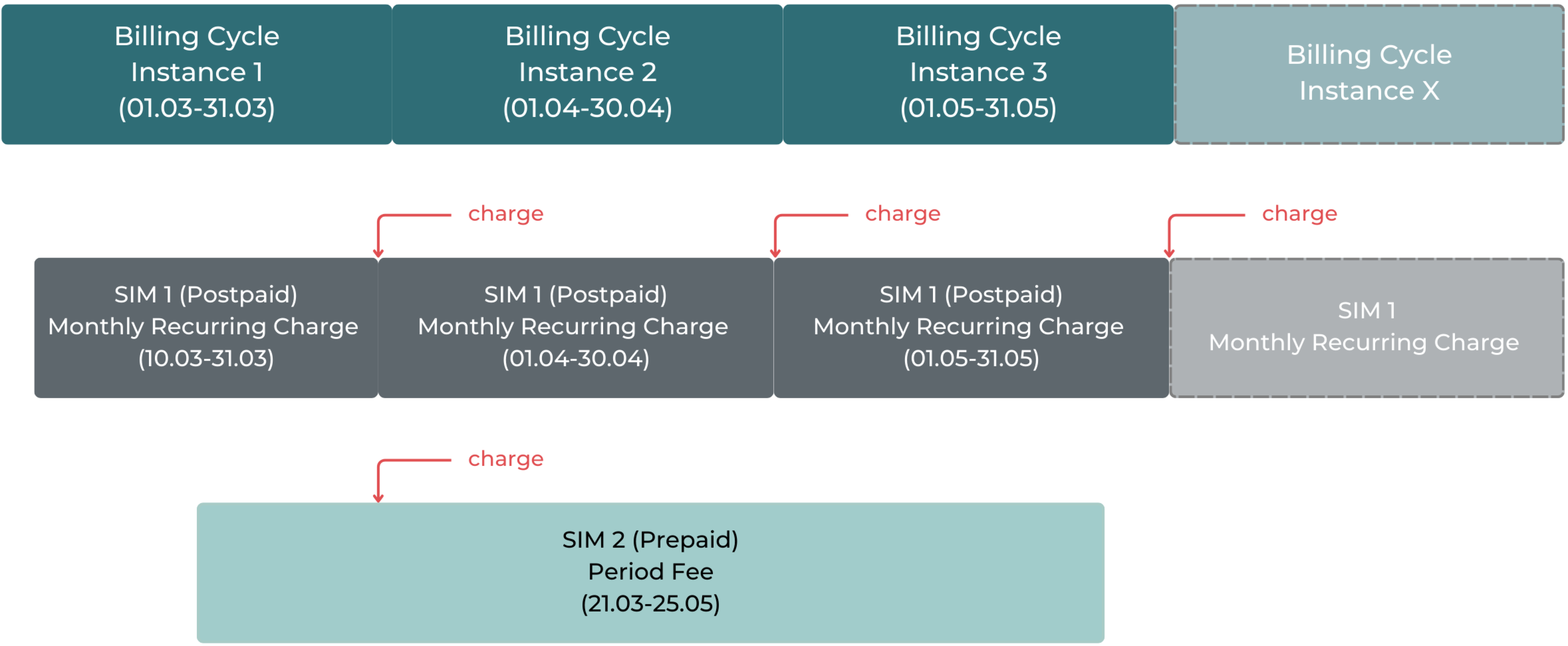
CMP executes one Billing Cycle Instance of each Billing Cycle Definition per month. Each cycle applies to all Accounts assigned to the related definition and automatically generates all types of costs (debit and credit) as configured in CMP.
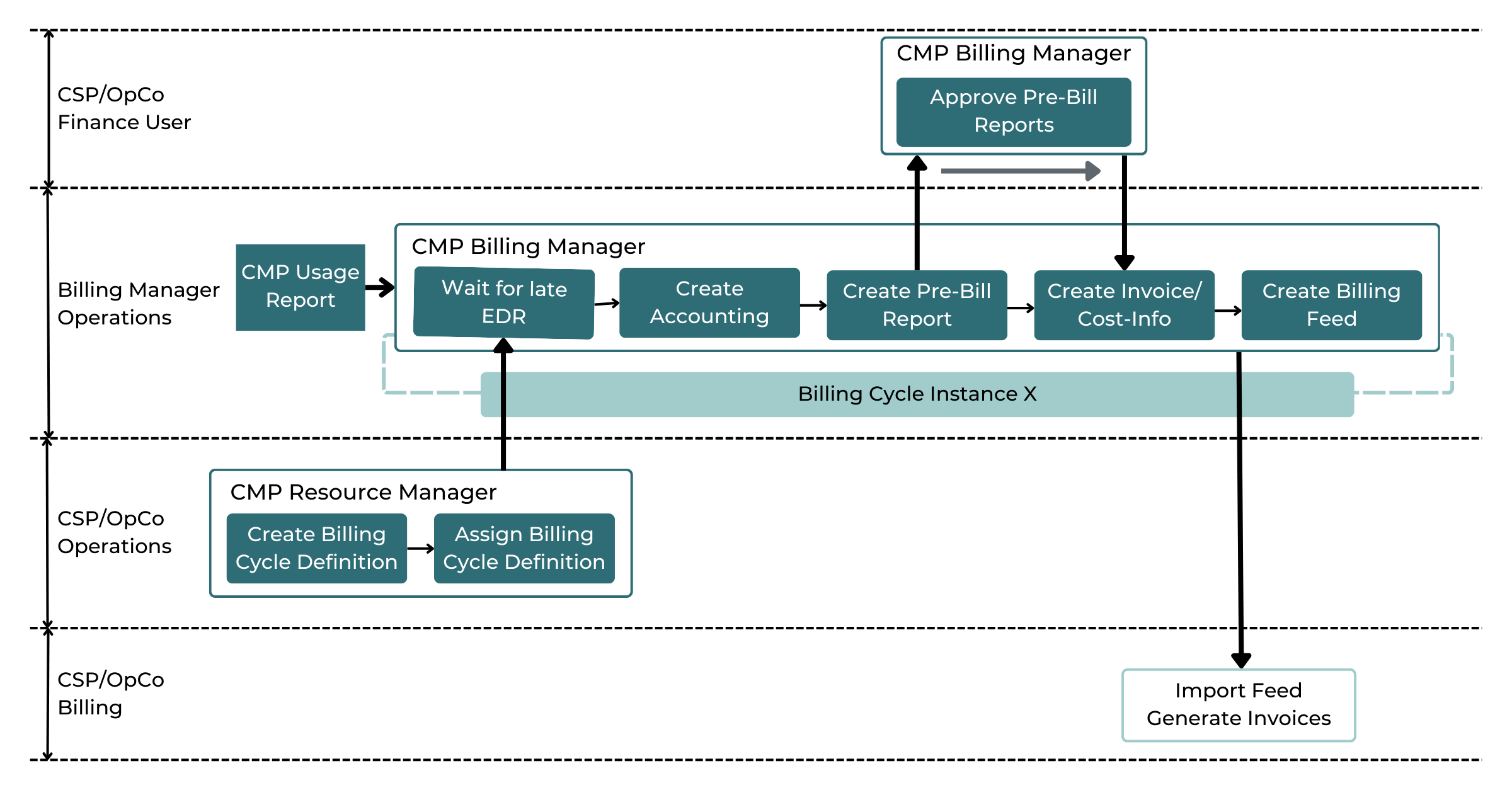
The diagram below displays the basic schema of a Billing Cycle Instance, as well as the key phases during the process.

Note:
By default, CMP generates a PDF file for every Billing Cycle and Account, which either reflects the legal Invoice or just a summary of all costs.
It can also be configured to not generate a PDF at all, in case CMP is not used for the legal Invoice and providing a Billing Feed. This way, CMP can significantly reduce the Billing Cycle execution time and the file storage size.
Billing Cycle Pre-Run
CMP allows CSP Users to review invoice charges and credits for each Billing Cycle for accuracy and approve them for Customer Billing.
Pre-Bill Reports provide the ability to review charges and credits applied to each Account during a Billing Cycle, and they can be checked once the Pre-Run of a Billing Cycle Instance finished. At this time, all charges and credits already got materialized in the Database, and the Instance is ready to proceed with the next step.
Each Pre-Bill Report has to be manually approved, before Customer Invoices and the Billing Feed are created and exported. Customer Invoices are only created and sent for billing if the Pre-Bill Report got approved. If the Pre-Bill Report gets declined, no Customer Invoices will be created and all accounting items will be discarded. Note that this action is permanent and cannot be reverted.
Further, in case of any errors during the execution of a Billing Cycle Instance, an error report gets provided.
The Instance does continue processing on Accounts which have no errors.
Once finished, the error state has to be either approved (in which case the errors are accepted and related items are not created) or reset (in which case the Instance will try to re-execute the failed items).
In case the root cause of an error did not get resolved properly before, a reset will lead to the same error again.
In case, errors are not either fully resolved or approved, the Billing Cycle Instance will not finish, and the Billing Feed will not get generated.